New Map
starts a new, flat map or a new monument. You pick its size, its height and the ground that covers it, then build on it.
When RustEdit starts, it opens a new empty map, so you only need this page to start another one.
Create a new map
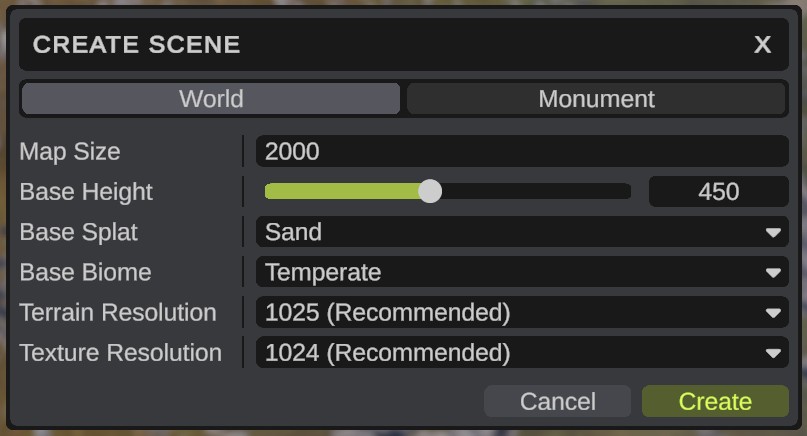
- Click . The Create Scene dialog opens.
- Click World at the top.
- Set the options. See the table below.
- Click Create. RustEdit asks if you want to start a new map, because unsaved changes to the open map and monuments are lost.
- Click Confirm. RustEdit makes a flat map with the base height, splat and biome you picked. The map has no file yet.
To keep the new map, save it. See Create, Open and Save.
Create Scene options
| Option | What it does |
|---|---|
| World / Monument | Makes a map, or a monument. |
| Map Size | The width of the map in meters, from 1000 to 8000. A larger or smaller number changes to the nearest limit. Above 6000 a warning box shows under it, before you create the map. See Maps larger than 6000 m. Only for World. |
| Monument Size | The width of the monument's terrain: 64, 128, 256, 512, 1024 or 2048 meters. Only for Monument. |
| Base Height | The height of the flat terrain, from 0 to 1000. The default is 450. 500 is sea level. |
| Base Splat | The ground texture that covers the whole terrain. |
| Base Biome | The biome that covers the whole terrain. |
| Terrain Resolution | The size of the height map: 513, 1025, 2049 or 4097. (Recommended) marks the one Rust's server uses for the map size, so a procedural run matches Rust's map. A higher resolution gives finer detail and a bigger file. Only for World. |
| Texture Resolution | The size of the splat, biome, topology and alpha maps: 512, 1024, 2048 or 4096. (Recommended) marks the one Rust's server uses. Only for World. |
Both resolutions start on the recommended ones for the map size. When you change Map Size, they change to the recommended ones again. A monument gets its resolutions from its size.
Base Height counts from the bottom of the terrain. In world heights, the ones the AI Tools use, sea level is 0 and the terrain goes from -500 to 500.
Maps larger than 6000 m
Above 6000, Map Size shows a warning icon and a warning box under it, with this text:
Rust supports maps up to 6000m. A server without the RustEdit extension will fail to load the map. Maps larger than 6000m are also required to disable the deep sea.
The server needs the RustEdit 2 server extension to load the map. Resize Map and Export Map show the same box, and Map Check lists it as a warning.
Create a monument
- Click . The Create Scene dialog opens.
- Click Monument at the top.
- Pick a Monument Size, and set the other options.
- Click Create. The new monument opens on top of your map, and your map waits behind it.
Monuments you had open are closed first, without saving. See Create and Edit Monuments.