IO Wiring
IO entities are the parts of Rust that pass power, water or items to each other: generators, batteries, solar panels, switches, logic gates, branches, lights, door controllers, card readers and more. In RustEdit you place them like any other prefab and connect them with wires in the Inspector. The wires and the entities' settings are saved with the scene and the exported map.
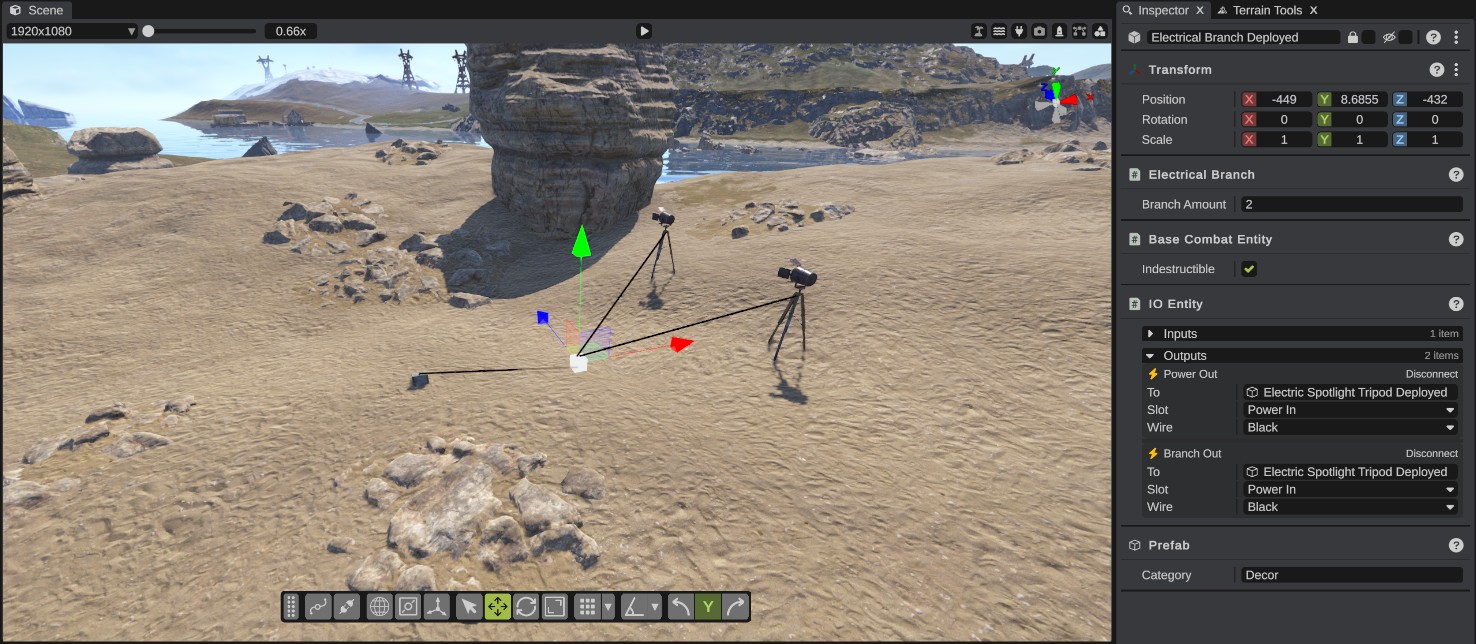
Inputs and outputs
Every IO entity has slots. Inputs take power in. Outputs send it on. A wire always goes from an output to an input.
Each slot has a type. The slot's card in the Inspector shows the type as an icon:
| Icon | Type |
|---|---|
| Bolt | Electric power |
| Drop | Water |
| Cog | Kinetic |
| Conveyor belt | Industrial (items) |
| Plug | Generic |
A wire connects two slots of the same type only.
The slot names come from Rust's prefab, for example Power In or Power Out. When an entity has more than one slot with the same name, RustEdit numbers them, so eight outputs named Output show as Output 1 to Output 8. A slot that has no name shows as Slot 1, Slot 2 and so on.
Power starts at a source, such as a generator, battery, solar panel or windmill, and goes down the wires. Each entity uses the power it needs and passes the rest on, as in Rust. RustEdit does not run the power while you edit. To see a circuit work, walk to it in Play mode.
Place IO entities
Place IO entities from the Content Browser, like any other prefab. See Placing prefabs.
Many monuments already have IO entities inside them, wired together by Rust's own prefab, for example the light switches of a supermarket. These wires belong to Rust's prefab. RustEdit does not show them and you cannot change them, but they work in Play mode.
How to connect two entities
- Select the entity that sends the power. The Inspector shows the IO Entity panel with its Inputs and Outputs.
- Under Outputs, find the slot to wire and click Connect. A wire follows the mouse from the slot.
- In the scene view, click the entity that the wire goes to. RustEdit connects the wire to that entity's first free input of the same type.
- The slot's card now shows the wire: To names the entity at the other end, Slot names its input, and Wire sets the wire's color.
To stop without making a wire, press Mouse Right.
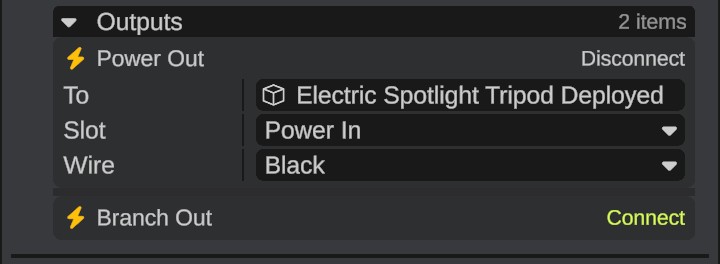
The IO Entity panel shows when one IO entity is selected. If you select more than one, it is hidden.
Change or remove a wire
| Row or link | What it does |
|---|---|
| To / From | The entity at the other end of the wire. Double-click the name to select that entity. |
| Slot | The slot at the other end. Pick another slot of that entity to move the wire there. Slots that have a wire already show Occupied, and slots of another type show Incompatible. RustEdit refuses both and says why in the log. |
| Wire | The color RustEdit draws the wire in: Black, Red, Green, Blue or Yellow. Water wires start green. RustEdit saves the color with the wire. Only an output's card has this row. |
| Disconnect | Takes the wire out. It works on both ends, the output's card and the input's card. |
An input with no wire shows Not connected. You cannot start a wire from an input: select the entity that sends the power and connect one of its outputs.
Making, moving or removing a wire is not an undo step. To take a wire out again, click Disconnect.
See the wires
- RustEdit draws the wires of the selected entities as straight lines from slot to slot, in the wire's color.
- To see every wire on the map, turn on the plug button in the scene view header (its tooltip says Toggle IO Connection Visibility).
- Hold the mouse over a slot's card in the Inspector. Its wire is drawn wider, in the highlight color, so you can find it in the scene.
- The wires of hidden entities are not drawn.
Entity settings
Many IO entities have a panel of their own under the IO Entity panel. These are the settings Rust keeps for each entity, such as how long a timer runs.
| Entity | Panel |
|---|---|
| Auto turrets | Auto Turret |
| Card readers | Card Reader |
| CCTV cameras | CCTV and RC Entity |
| Door controllers | Door Manipulator |
| Electrical branches | Electrical Branch |
| Elevators that players build | Elevator |
| Neon signs and other signs | Neon Sign, Signage |
| Counters | Power Counter |
| Buttons | Press Button |
| RF broadcasters and receivers | RF Broadcaster, RF Receiver |
| Telephones | Telephone |
| Timer switches | Timer Switch |
Changes in these panels are not undo steps either.
Decorative wires
Rust also has a wire prefab that is only a model: a cable you can hang between two points, for example between poles. It carries no power. To set its two ends, see Wire Prefab.
What is saved
- The scene file keeps each wire on its output: the entity at the other end, the input slot and the wire's color. It also keeps each entity's settings.
- The exported map keeps the IO entities you placed, with their wires and settings, in RustEdit's own data in the map. They are not in Rust's prefab list. On the server, the RustEdit 2 server extension spawns them with their wires and settings. See The RustEdit 2 server extension.
- The wires inside Rust's monument prefabs are not saved. Rust's prefab brings them.
- Deleting an entity removes its wires, on both ends. Ctrl+Z brings the entity back with the wires from its own outputs. The wires that came into it from entities you did not delete stay gone: connect them again.
Troubleshooting
| Problem | What to do |
|---|---|
| The log says "This object does not accept incoming connections" | The entity you clicked has no inputs. Wire it the other way round: select it and connect one of its outputs. |
| The log says "The selected IO entity does not allow ... type connections" | The entity has no input of the wire's type, for example a water output to a light. Pick an output of another type, or another entity. |
| The log says "This object has no free input slots" | Every input of that type has a wire already. Disconnect one first. |
| The log says "The selected object is already connected to the target entity" | The entity already has a wire from the entity you are wiring. RustEdit allows one wire between the same two entities. |
| Clicking the entity does nothing | Click the entity's model. Clicking the ground or another object does not end the wire. Press Mouse Right to stop. |
| The IO Entity panel is missing | Select only one IO entity. |
| A wire is not drawn | Select one of its entities, or turn on the plug button in the scene view header. Wires of hidden entities are not drawn. |