Tunnel Editor
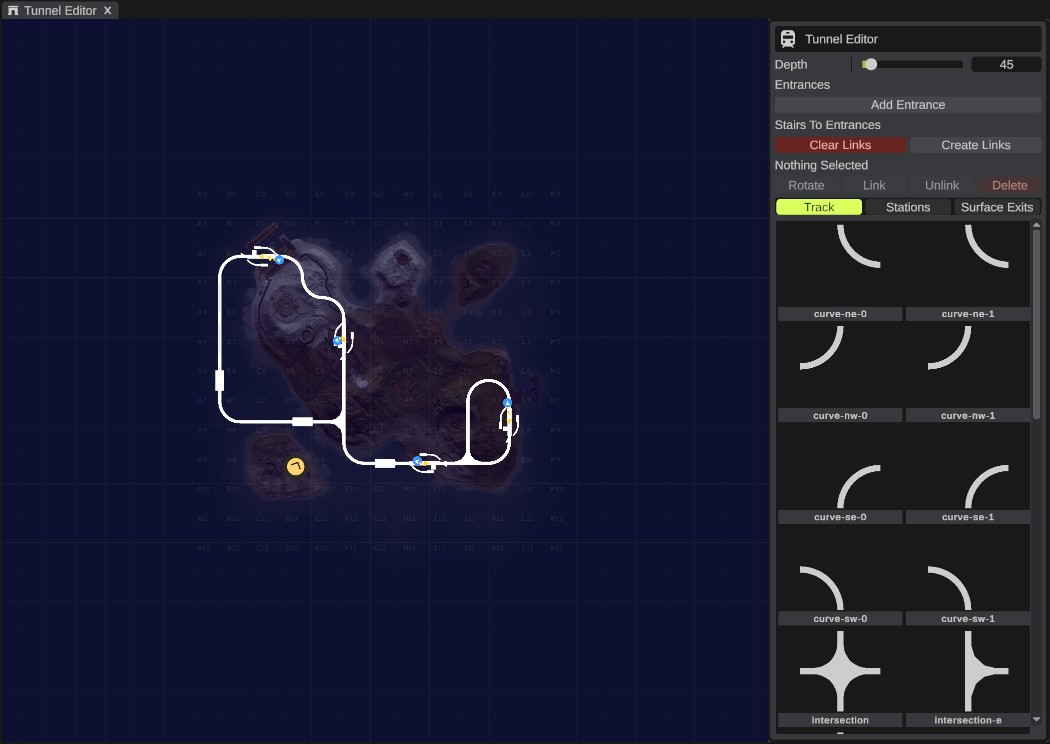
RustEdit PlusThe Tunnel Editor builds the underground train tunnels on a map of your world. You click tunnel pieces into a grid, like Rust's own tunnel generator does. RustEdit puts in the pieces that join different track kinds, and can build the stairs from stations up to entrances.
Before you start
- You need RustEdit Plus. Without it, the panel shows "This feature requires RustEdit Plus" and does nothing.
- Rust's content must be loaded. The first time you open the panel, it loads the tunnel prefabs ("Loading tunnel prefabs") and draws their icons ("Drawing tunnel icons"). This can take a moment.
Open the Tunnel Editor
Click the tunnel button in the toolbar on the left, or open .
The panel shows the map with a grid. Each grid cell is 216 m wide, the same grid Rust's tunnels use, so pieces in neighboring cells join up.
- Drag with Mouse Right or Mouse Middle to move the map.
- Turn the mouse wheel to zoom.
Place tunnel pieces
- Pick a tab: Track, Stations or Surface Exits.
- Click a piece in the palette. The piece follows the mouse over the map. It is red over a cell that has a piece already.
- Click an empty cell to place the piece there. Click more cells to place more.
- To put the piece down, click it in the palette again, click Mouse Right without moving the mouse, or press Esc.
Each piece has its direction in its name, for example a straight piece running south to north. Pick the piece that points the way you need.
| Tab | Pieces |
|---|---|
| Track | Rust's tunnel track pieces, such as straight pieces and curves. |
| Stations | Stations. Their stairs can lead up to an entrance. |
| Surface Exits | Straight track with a side branch that climbs to the surface railway. The number is how high it climbs. |
When two neighboring pieces have different kinds of track, RustEdit puts a transition piece between them, like Rust's generator. It removes transitions that are no longer needed.
A red bar on the side of a piece means its track does not join a neighbor on that side. Place or change pieces until no red bars are left.
Select, move and delete pieces
- Click a piece to select it. The panel shows "Selected:" and its name.
- Drag a piece to another empty cell to move it.
- Press Delete or click Delete to delete the selected piece.
- Press Esc to clear the selection.
Delete works while the mouse is over the map.
Depth
Depth is how far below sea level the track goes, in meters. It moves in steps of 9 m, from 9 to 495. With no pieces yet it is 135. Changing it moves every tunnel piece to the new depth.
After you change the depth, the stairs no longer reach the stations. Click Clear Links, then Create Links, to build them again.
Entrances
Entrances are the buildings on the surface where players go down into the tunnels.
- Click Add Entrance to add one in the middle of the map view.
- Drag an entrance to move it. It snaps to a 3 m grid and sits on the ground.
- Select an entrance and click Rotate, or press R, to turn it a quarter turn.
Entrances that belong to a monument are grey. You cannot move, turn or delete them.
Stairs to entrances
A station needs stairs up to an entrance. An arrow on each station shows the side its stairs go up from.
| Button | What it does |
|---|---|
| Create Links | Joins each station without stairs to the closest free entrance. The app says how many were linked and how many could not be. |
| Clear Links | Removes all stairs between stations and entrances. |
| Link | Joins the selected station to the closest free entrance. |
| Unlink | Removes the stairs from the selected station or entrance. |
A station links to the closest free entrance on the side its stairs go up from. If there is none, or no way to reach it, the app says "No free entrance on the side the station's stairs go up from, or no path to it". Add an entrance on that side, then try again.
Moving or deleting a station, or moving or turning an entrance, removes its stairs.
Undo and saving
Every change in the Tunnel Editor is one undo step: placing, moving and deleting pieces, the depth, entrances and links.
The tunnel pieces, entrances and stairs are normal prefabs in the scene. They show in the Hierarchy and are saved and exported like any other prefab.