IO in Play Mode
RustEdit PlusIn Play mode, the map's IO entities run as they do on a Rust server. Power goes from generators and batteries through switches, gates and branches to lights, door controllers and card readers. You walk up to a switch, press E, and the light comes on. This lets you test your circuits and your monument puzzles before you export the map.
IO runs only while you play. While you edit, RustEdit shows each entity as the map has it and moves no power. When you stop, everything goes back.
When play starts
- Every IO entity starts fresh, as on a server that spawns the map. Each one keeps the on and off state the map has.
- Power sources start to send power about one second after play starts.
- The wires inside Rust's monument prefabs join in, so a monument's own puzzle works with the wires you made. These wires are never shown and never saved.
- A door controller works the door that Rust's prefab gives it. If it has none, it takes the nearest door, as a server does when it spawns the map.
Use things
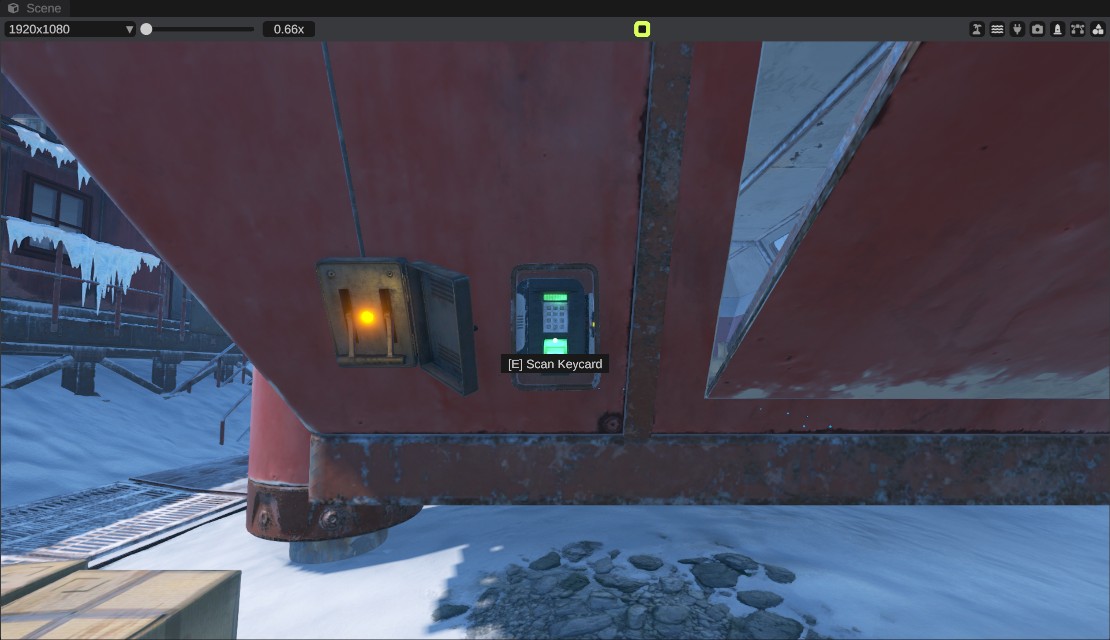
Look at the thing within 3 m. The line under the crosshair says what E does. Press E. You do not need the items the game asks for: you act as if you had them.
| Thing | Line under the crosshair | What happens |
|---|---|---|
| Doors that open by hand | Open Door / Close Door | The door opens or closes. |
| Switches and smart switches | Turn On / Turn Off | The switch flips. |
| Fuel generators | Turn On / Turn Off | The generator runs as if it had fuel, and uses none. |
| Buttons | Press | The button sends power for a short time. |
| Timer switches | Start Timer | The timer starts. It needs power first. |
| Card readers | Scan Keycard | Any reader takes the swipe, whatever its color. It needs power. Access stays open until you stop playing. |
| Monument fuse boxes | Insert Fuse / Remove Fuse | Puts a fuse in or takes it out. The fuse does not wear out. |
| Wheel valves | Turn Wheel | Hold E to turn the wheel. It stops when you let go or walk more than 2 m away. |
| Batteries | Charge Battery | Fills the battery at once. A battery on a new map is empty and charges slowly. |
| Water containers | Fill With ... / Empty ... | Fills the container as if you poured water in, or empties it. |
| Water wells | Pump Water | Pumps the handle. |
| Reactive targets | Shoot Target / Reset Target | Knocks the target down as if you shot it, or puts it back up. |
| Boom boxes | Play Radio / Stop Radio | Plays or stops the boom box. RustEdit plays no sound. |
| Industrial conveyors and crafters | Turn On / Turn Off | Switches them. They need power to switch on. |
| Lifts | Use Lift | Sends the lift to its next stop. |
| Elevator buttons | Go Up, Go Down, Go To Top Floor, Go To Bottom Floor | Sends the elevator. |
Some things work without E:
- Pressure pads give power when you step on them, and pass their input's power on while you stand on them.
- Solar panels make power from the sun, by how they face it and whether something is in the way. Windmills make power from the wind.
- Lights, sirens, strobes and counter screens show whether they have power.
- RF broadcasters send on their frequency while they have power, and RF receivers on the same frequency pass their power on.
- Water runs down the wires from a container or a pump. A wire can lift water 1 m at most, unless a pump pushes it.
What does not work in Play mode
- Turrets start up when they get power, but they look for no targets and fire nothing.
- CCTV cameras cannot be watched: there is no computer station to watch them from.
- Telephones never ring, so they pass no power on.
- Conveyors and crafters move and craft no items, because RustEdit has no items in containers.
- Some monument puzzles: the water treatment plant's wheel puzzle, the coaling tower, the car garages, and the power grid that the Power Plant feeds (its fuse stages and the power line access points).
The keycard puzzles of the monuments work: insert the fuse, turn on the switch, scan the card, and the door opens. They were checked at the Satellite Dish, Sphere Tank, Power Plant, Ferry Terminal, Harbor, Airfield and Launch Site.
When you stop
Everything goes back to how the map has it:
- Every entity's on and off state: doors, lights, switches, card readers and the like.
- Battery charges, counters, wheels, sliding doors and the doors that door controllers work.
- Lifts and elevators go back to where they were.
- Timers and power on its way are dropped. The monument wires are taken out again.
Nothing you did while playing is saved.
Tips
- Walk through each puzzle in Play mode before you export the map. It is faster than testing it on a server.
- Before you play, select an entity and check its wires in the Inspector, or turn on the plug button in the scene view header to see every wire. See IO wiring.
Troubleshooting
| Problem | What to do |
|---|---|
| Nothing gets power | The circuit needs a power source, such as a generator, battery or solar panel. Power starts about one second after play starts. Check the wires in the Inspector after you stop. |
| A card reader shows no Scan Keycard | The reader needs power, and it must not be open already. |
| A timer shows no Start Timer | The timer needs power on its power input, and it must not be running. |
| A battery gives no power | A battery on a new map is empty. Look at it and press E to charge it. |
| A door controller does nothing | It needs a door within 1 m. Check Has Valid Placement in its Door Manipulator panel. |