Rust Generator Graphs
RustEdit ProThe Rust generator graphs are four custom nodes that rebuild Rust's own map generator from normal Terrain Graph nodes: Rust Height, Rust Biome, Rust Topology and Rust Splat. Wired together, they make a map very close to the one Rust's generator makes from the same seed. Because they are plain graphs, you can open them and change any part: the island shape, the mountains, where snow goes.
The four custom nodes come with RustEdit as examples. The first time you open the Terrain Graph, RustEdit copies them into your custom node folder (the Custom Nodes folder of Settings). After that they are yours: you can change, rename or delete them, and RustEdit does not copy them again.
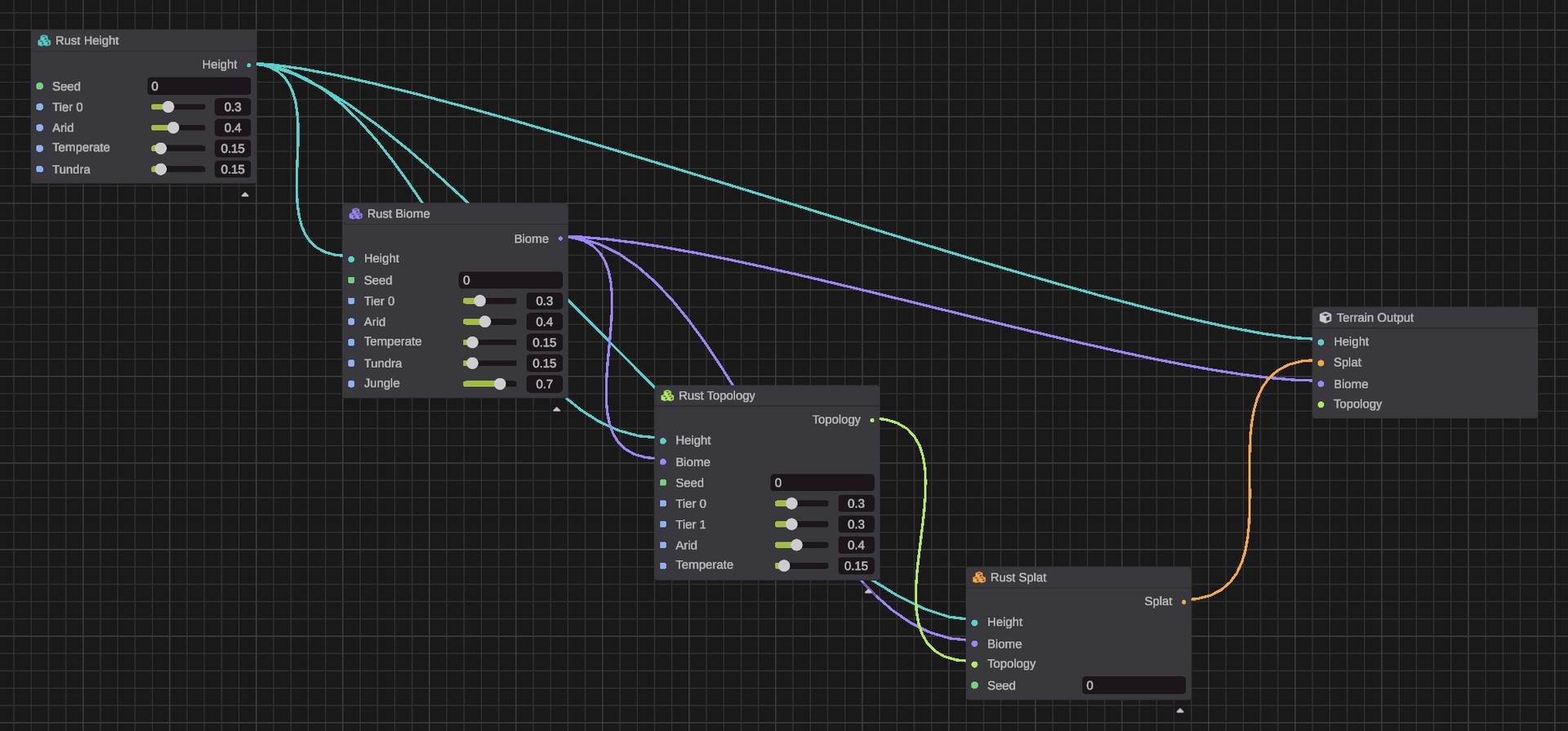
The four custom nodes
They are under .
| Custom node | Inputs | Output |
|---|---|---|
| Rust Height | Seed, Tier 0, Arid, Temperate, Tundra | Height |
| Rust Biome | Height, Seed, Tier 0, Arid, Temperate, Tundra, Jungle | Biome |
| Rust Topology | Height, Biome, Seed, Tier 0, Tier 1, Arid, Temperate | Topology |
| Rust Splat | Height, Biome, Topology, Seed | Splat |
Each one needs the maps made before it, in the same order as Rust: height, then biome, then topology, then splat.
The number inputs
| Input | Default | What it is |
|---|---|---|
| Seed | 0 | The map's seed. 0 uses the graph's seed: add a Graph Seed node and change it for a new map. |
| Tier 0, Tier 1 | 0.3 | The share of the map for each loot tier band. |
| Arid, Temperate, Tundra | 0.4, 0.15, 0.15 | The share of the map for each biome band. |
| Jungle | 0.7 | How much temperate ground in the Tier 0 band turns into jungle. |
The defaults are Rust's. They are the same settings as Percentage Tier0, Percentage Biome Arid and the others in the World settings of the Procedural Generation panel. Each takes a value from 0 to 1.
The graphs read the open map's size, as Rust's generator does, so the same seed gives a different map on a different map size.
Build Rust's terrain
- Open the Terrain Graph window.
- Add Rust Height, Rust Biome, Rust Topology and Rust Splat from .
- Add a Graph Seed node, and type a seed into it.
- Wire Rust Height's Height into the Height input of the other three, and into the Terrain Output's Height.
- Wire Rust Biome's Biome into Rust Topology and Rust Splat, and into the Terrain Output's Biome.
- Wire Rust Topology's Topology into Rust Splat.
- Wire Rust Splat's Splat into the Terrain Output's Splat. The terrain previews Rust's height, biomes and ground textures for that seed.
- Click Apply to write them into the map.
To give the map Rust's topology too, also wire Rust Topology's Topology into the Terrain Output's Topology. Apply then replaces all of the map's topology, also topology you painted.
The Topology Map step in Procedural Generation does not give the same topology from the same seed. Rust runs each step with the map's seed plus the step's place in the list, and takes the tier and biome directions from the map's seed. The Rust Topology node uses its one Seed for both. With the map's seed, the tier and biome borders match, but the noise in the fields, forests and the like does not.
Change a Rust generator graph
All the graphs that use a custom node share it. Make your own copy before you change one:
- Right-click the placed custom node, for example Rust Height, and pick Make Unique. It now uses a copy called Rust Height Copy.
- Double-click it to open it. The inside is laid out in named group boxes, such as Island shape and coast, Hills and Mountains.
- Change what you want, for example a noise's Scale, then click the back arrow.
You can also use only some of them. For example:
- Feed your own height map, or Current Map's Height, into Rust Biome and Rust Splat to give your own landscape Rust's biomes and ground textures.
- Use Rust Height for the shape, then paint biomes and splat with your own nodes.
See Custom nodes for how to edit and share custom nodes.
How close they are to Rust
They are very close, but not the same to the last pixel. The graph's noise runs on the graphics card and differs from Rust's by a tiny amount. In RustEdit's tests against Rust's generator:
| Map | Difference |
|---|---|
| Height | About 4 mm on average. |
| Biome | About 2% of points differ, by a tiny amount. |
| Topology | About 0.1% of cells differ, only for the Field, Forest, Forestside and Alt flags at the edges of noise. Every other flag matches. |
| Splat | About 2 to 3% of points differ, by a tiny amount. |
For a map that is exactly Rust's, run Rust's own steps in Procedural Generation.
Tips
- These are big graphs: Rust Height has more than 300 nodes. Opening one takes a moment.
- The graphs use portals to keep their wires short. Hover a pill to see where it goes. See Portals.