RustEdit Cloud
RustEdit ProRustEdit Cloud keeps your maps and monuments on RustHQ. You can open them on any computer you sign in on, go back to an older version, share them with a link, and work on them together in team folders. You can also put a Rust map online for your server.
Before you start
- Sign in to RustHQ in RustEdit.
- Cloud files, team folders, share links and hosted maps need RustEdit Pro. Settings Sync needs RustEdit Plus.
- Anybody who is signed in to RustHQ can open a share link, also without a subscription.
The Cloud menu
All cloud items are in . The menu shows when you are signed in and RustHQ can be reached.
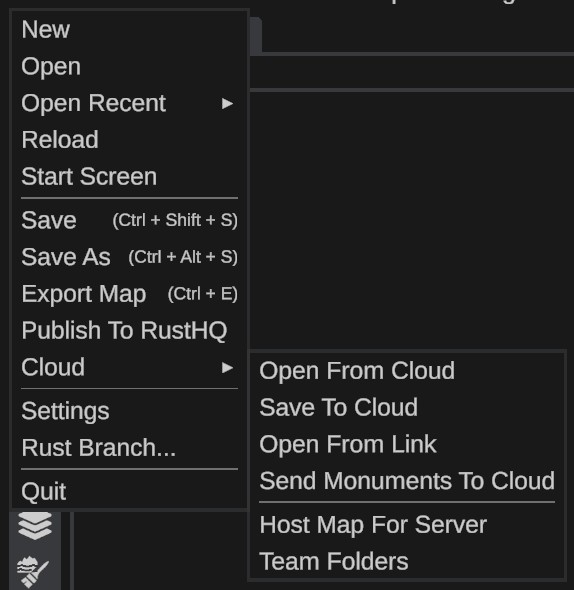
| Item | What it does |
|---|---|
| Open From Cloud | Lists your cloud files and opens one. See Save And Open Cloud Files. |
| Save To Cloud | Saves the open map or monument and sends it to the cloud. |
| Open From Link | Opens a file that somebody shared with you. See Share Links. |
| Send Monuments To Cloud | Sends monuments from your Custom Monuments folder without opening them. See Cloud Monuments. |
| Host Map For Server | Puts a .map file online for your server. See Hosted Maps. |
| Team Folders | Folders you share with other RustHQ members. See Team Folders. |
What you get
| RustEdit Plus | RustEdit Pro | RustEdit Sponsor | |
|---|---|---|---|
| Cloud space | - | 10 GB | 25 GB |
| Space for settings sync | 50 MB | 50 MB | 50 MB |
| Versions kept of each file | - | 10 | 30 |
| Largest file | - | 500 MB | 1 GB |
| Hosted maps | - | 25 | 100 |
| Share links at one time | - | 25 | 100 |
| Team folders you own | - | 1 | 5 |
| People in each team folder | - | 5 | 20 |
RustHQ can change these numbers. RustEdit always uses the numbers RustHQ gives it.
Your files, their older versions, your trash and your hosted maps all use your cloud space. The files in your team folders use your space too, also when a member saves them.
How much space you use
A bar under your folders shows how much space you use, for example "220 KB of 10 GB used". It is in Open From Cloud, Save To Cloud and Send Monuments To Cloud. The RustHQ Account dialog shows the same line, for example "Cloud: 220 KB of 10 GB used".
RustEdit sends only the parts of a file that changed. A small change to a large map sends little. The parts that two of your files share use space once.
When you delete a file forever, the space comes back after RustHQ's daily clean-up, within about a day.
When your subscription ends
You can still open and download your cloud files, but you cannot save new ones. Open From Cloud says until when RustHQ keeps your files. If your files use more space than your plan has, delete some files to save again.
Cloud files in multiplayer sessions
When you host a session with a map that is in the cloud, saved and fully sent, the people who join get the map from RustHQ instead of from your computer. If that does not work, they get it from you as usual.