Share Links
RustEdit ProA share link lets other people get a copy of one of your cloud files. They cannot change your file. Anybody who is signed in to RustHQ can open a link, also without a subscription.
Make a link
- Open .
- Click the file, then click the Share (link) button.
- Set Follow Newest:
- On: the link always gives the newest version.
- Off: the link stays on the version saved now.
- Set Link Ends: Never, After 1 Day, After 7 Days or After 30 Days.
- Click Make Link. The link is copied, ready to paste.
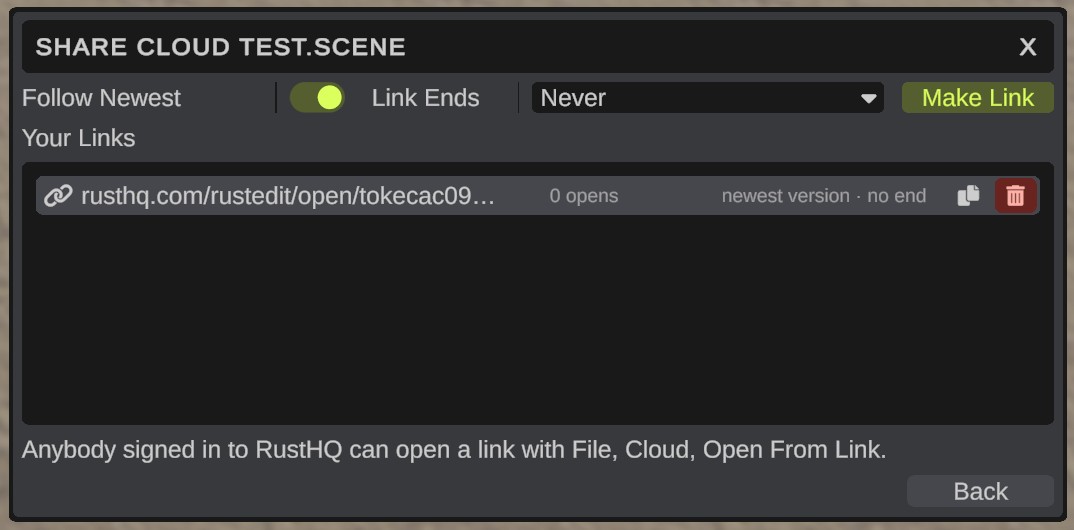
Your Links lists the file's links. Each row shows how often the link was opened, which version it gives and when it ends. Click a link to show its buttons:
- Copy: copies the link again.
- Delete (bin): ends the link. People who have it cannot open the file with it any more.
You can have 25 links at one time, 100 with RustEdit Sponsor. A link with Follow Newest off keeps its version in the cloud, also when newer versions push it out of the version list. That version uses your space until the link is deleted or ends.
Click Back to go back to your files.
Open a link
- Copy the link.
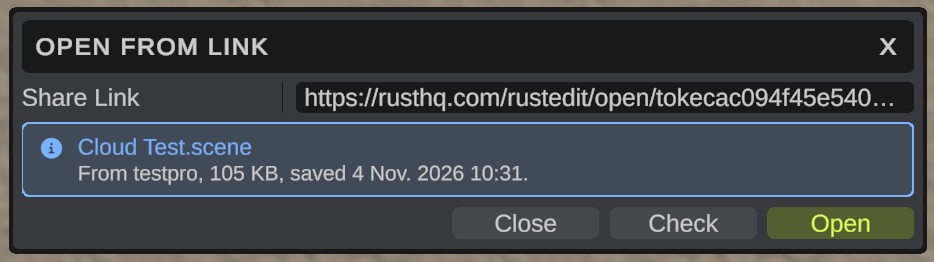
- Open . A RustHQ share link you just copied is pasted in for you, and RustEdit checks it.
- The box shows the file's name, who shared it, its size and when it was saved. If it does not show, click Check.
- Click Open. RustEdit asks first, because changes to the open map that are not saved are lost.
You get your own copy. Nothing you do to it changes the shared file, and it is not linked to the cloud. To keep it in your own cloud, use .
The link also works in a web browser, where it opens a page about the file on RustHQ.