Rust Update Check
RustEdit PlusRust updates sometimes remove, rename or change prefabs. The Rust Update Check lists the prefabs in your scene that the installed Rust files removed, renamed or changed since the scene was saved, and suggests a replacement for each one.
Check the scene
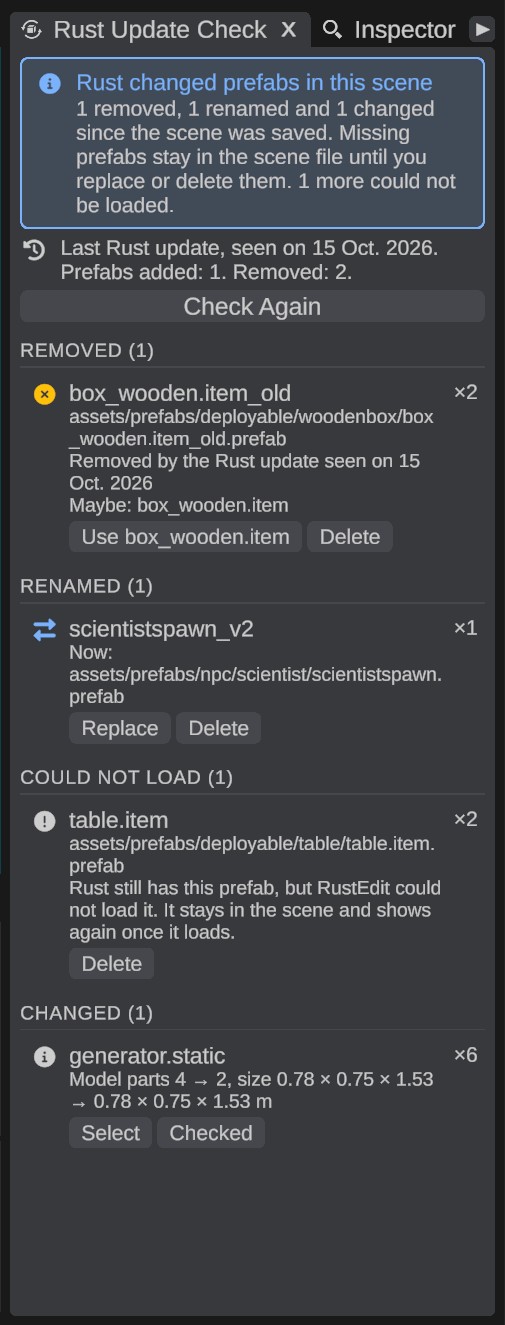
- Open . The panel checks the open scene. The box at the top says, for example, 2 removed, 1 renamed and 1 changed since the scene was saved.
- Look at the rows. They are in groups: Removed, Renamed, Could Not Load and Changed. A group shows only when it has rows.
- Click a row. The camera moves to the next copy of that prefab.
- Replace, delete or check each one. See below.
The line under the box tells what the last Rust update added and removed, and when this computer first saw it.
Click Check Again after you change the scene by hand. The panel follows undo and opening another scene by itself.
While the panel is open, the scene view shows a box with the prefab's name at each missing prefab.
Removed prefabs
Rust no longer has the prefab, under any path. The row shows:
- the prefab's name and old path. When the scene has no record of the prefab, the row says The scene has no record of its path. The list of Rust versions on this computer can still name it when an older Rust version had it.
- Removed by the Rust update seen on a date, when this computer saw that update.
- a prefab that may take its place: Maybe: and its name.
To replace the copies:
- Click Use and the suggested prefab's name, or
- drag a prefab from the Content Browser onto the row, or
- right-click a prefab in the Content Browser and pick Replace name with this, where name is the removed prefab.
The suggestion comes from the prefabs the same Rust update added, with the same or a close name. Without one, it is a prefab with the same file name in another folder, or a close name in the same folder. Look at it before you use it.
Renamed prefabs
Rust moved the prefab to another path, or gave it another name. RustEdit finds the new path and shows it: Now: and the path. Click Replace to put the prefab back under its new path.
Could Not Load
Rust still has the prefab, but RustEdit could not load it. Rust did not remove it, so the row has no replacement. The prefab stays in the scene file, and it shows again once it loads.
Some prefabs never load in RustEdit, for example an item's prefab such as table.item: it is not a prefab you can place in a map. Click Delete to take those out of the scene.
When the panel finds only prefabs that did not load, the box at the top says Some prefabs did not load. When this stays after RustEdit starts again, let Steam check the Rust files.
Changed prefabs
The prefab is still there, but its model parts or its size changed. The row shows the number of model parts and the size, then and now. The scene shows the new version.
- Click Select to select every copy, to look at them or move them.
- Click Checked when you are happy with them. The row goes away, and the next save writes how the prefab is now.
What Replace and Delete do
- Replace, Use and a drop put the new prefab where each copy was: same place, turn, size, parent and name, and the same saved data, such as IO settings. The new copies are selected. It is one undo step.
- Delete asks first. The copies are gone from the scene file when you save it. Press Ctrl+Z to bring them back before that.
Prefabs Rust removed stay in the scene
This part works for everyone, also without RustEdit Plus.
When a scene or a map has a prefab that your Rust files do not have, RustEdit cannot show it. It keeps the prefab anyway, with its place, turn, size, name and saved data, and writes it back when you save. A Rust update never deletes prefabs from your scene file.
- When the scene opens, the Notifications panel says how many prefabs could not be loaded.
- The exported map leaves them out, because the game cannot spawn them either. The Notifications panel says how many it left out.
The same goes for a prefab Rust still has, but that RustEdit could not load. See Could Not Load.
What RustEdit remembers
To find what changed, RustEdit keeps two things:
- In each scene file: a record of every prefab the scene uses, with its path, its model and its size. RustEdit writes it each time you save.
- On this computer: a list of every prefab of each Rust version RustEdit saw, and what each Rust update added and removed. RustEdit brings it up to date each time it starts. It starts with the first version it sees, so older Rust updates are not in it.
So a changed prefab is only found in a scene that was saved before the Rust update, with this version of RustEdit.