Brushes
A brush is a black and white picture. It sets how strong a tool is at each point under the brush: white is full strength, black is no effect, and grey is in between. Every sculpt and paint tool in the Terrain Tools uses the brush you pick.
Pick a brush
- Open the Terrain Tools and turn on Sculpt or Paint.
- In the Brushes grid, click a brush.
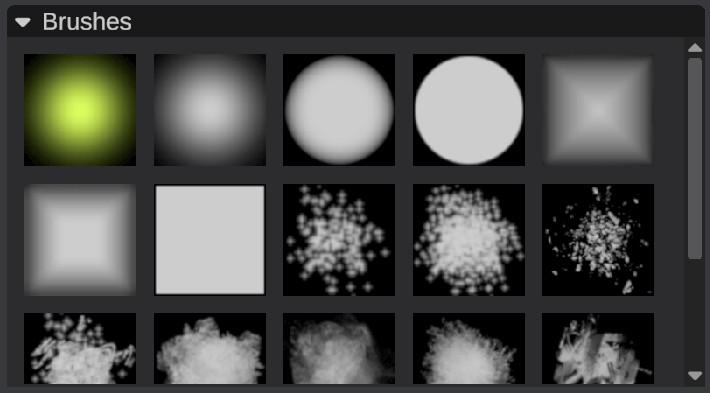
RustEdit comes with 18 brushes: soft round brushes, a square brush, and textured brushes with speckles and noise. A soft brush fades out to its edge, so its strokes blend into the ground around them. A textured brush gives a rough, natural look.
The brush you pick is used by every tool. The Stroke settings set its size and rotation. See Stroke settings.
The Stamper does not use these brushes: it has its own height pictures. See Clone and Stamper.
Add your own brushes
- Make a square PNG picture in black and white. White is where the tool works at full strength.
- Put the file in your Brushes folder. By default, this is the
Brushesfolder next to the RustEdit app. To use another folder, set it at , in Paths > Brushes. - Restart RustEdit. Your brushes show in the grid after the built-in ones.
If the Brushes folder is not there, RustEdit makes it.
Keep the edges of the picture black. The tool has no effect outside the picture, so white edges give a stroke with hard, square edges.
RustEdit reads the red channel of the picture. Use a grayscale picture: in a colored picture, only the red part counts.
The greys of your own brushes work weaker than the same greys in the built-in brushes. A 50% grey works at about 20% strength. White and black work as expected. If the soft edge of your brush fades out too fast, make its greys lighter.
The filter-stacks folder
The Brushes folder also has a filter-stacks folder. RustEdit saves the filters of each tool there, one file per tool. A tool with no filters has no file. To start a tool with no filters, close RustEdit and delete the tool's file. RustEdit saves the filters again when it closes, so a file deleted while it runs can come back.