Resize Map
Resize Map gives the map a new size. It can stretch the map, add land around it, or cut its edges off.
Before you start
- Save the map. Resizing clears the undo history. If you do not like the result, brings back the saved map.
- Go back to the map if a monument is open, and apply or stop any terrain graph preview.
- In a multiplayer session, only the host can resize the map.
How to resize the map
- Click . The Resize Map dialog opens with the map's current size.
- Type the new Map Size.
- Pick a Mode. The line at the bottom of the dialog says what the mode does.
- Check the resolutions. A new size picks the recommended ones.
- Click Resize. RustEdit asks you to confirm, because the map loads again and the undo history is cleared.
- Click Confirm. RustEdit makes the map at its new size and loads it. The Notifications panel shows the new size and resolutions.
The map keeps its file and password, but it is not saved yet. Save it to keep the new size.
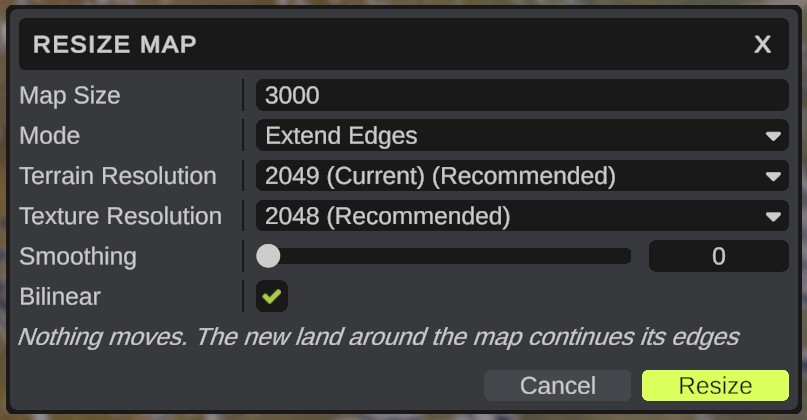
Options
| Option | What it does |
|---|---|
| Map Size | The new width of the map in meters, from 1000 to 8000. A warning icon shows above 6000: the server needs the RustEdit 2 server extension to run maps larger than 6000. |
| Mode | How the terrain and the prefabs follow the new size: Scale, Extend Edges or Cut Edges. See the next section. |
| Terrain Resolution | The resolution of the height map. (Current) marks the map's resolution now, (Recommended) the best fit for the new size. |
| Texture Resolution | The resolution of the splat, biome, topology and alpha maps, marked the same way. |
| Smoothing | Blur passes over the heights after the resize, from 0 to 10. Softens steps when the map gets bigger. The default is 0. |
| Bilinear | On: blend between pixels. Off: take the nearest pixel. On by default. |
Modes
| Mode | Terrain | Prefabs and paths |
|---|---|---|
| Scale | Stretches or shrinks to the new size. | Move with the terrain: their places spread out or come closer across the map. Their heights, turns and sizes stay. Paths stretch with the map. |
| Extend Edges | The map gets bigger around its center. The new land around the map continues its edges. | Nothing moves. |
| Cut Edges | The map gets smaller around its center. | Nothing moves. Prefabs and paths outside the new map are removed. |
Extend Edges needs a bigger size and Cut Edges a smaller one. If the size does not fit the mode, the Mode field shows an error icon and Resize does nothing.
What Cut Edges removes
- A prefab is removed when its place is outside the new map.
- A group is looked into. It is removed when nothing is left in it.
- A path keeps the parts inside the map. A path that leaves the map and comes back becomes several paths. APC interest nodes outside the map are removed.
The Notifications panel shows how many prefabs and paths were removed.
What else changes
- Custom topology maps change with the terrain.
- Heights stay the same. Only the width and depth of the map change.
Undo
You cannot undo a resize: the undo history is cleared. To go back, use before you save.