Map Password
RustEdit PlusA map password locks your scene file and the RustEdit data in the exported map. Nobody can open them in RustEdit without the password. Rust servers still load the map as normal.
What the password locks
| File | With a password |
|---|---|
.scene | The whole file is locked. |
.map | Rust's data stays open, so any server can load the map. RustEdit's own data is locked, and RustEdit does not open the map without the password. See Save and Export. |
.asset (monument) | Never has a password. Maps can place monuments without asking for one. |
Before you start
You need RustEdit Plus to set a password. Opening a locked file needs no tier: anyone with the password can open it. See Tiers.
How to set a password
RustEdit asks for the password when you:
- save a map for the first time,
- use , or
- use .
- Start one of the saves above. The Map Password dialog opens.
- Type the password in the Password field. Click the eye button to see what you typed.
- Click Save. RustEdit saves the scene, and the map if you export, locked with the password.
A plain keeps the password the scene has and does not ask.
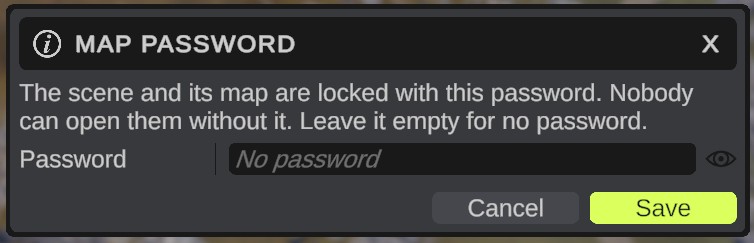
Change or remove the password
- Click or . The Map Password dialog shows the current password, hidden.
- Type a new password, or clear the field for no password.
- Click Save.
Cancel stops the save. Nothing is written.
How to open a locked file
- Open the file with or . The Password Required dialog opens.
- Type the password.
- Click Submit. The file opens. RustEdit keeps the password, so the next Save locks the scene with it again.
If the password is wrong, the dialog opens again. Cancel stops loading, and the map you had open stays.
The same dialog opens when you pick a locked map in Merge Map.
Options
| Option | What it does |
|---|---|
| Password | The password. Leave it empty for no password. |
| Eye button | Shows or hides the password you type. |
| Dump Passwords (in , Password) | Off by default. On: each time you save a map with a password, RustEdit adds a line to Configuration/passwords.txt in the RustEdit folder: the date, the file and the password. |
If you forget the password
Nobody can open the file without its password. Keep your passwords somewhere safe.
If you turned Dump Passwords on before you saved, open Configuration/passwords.txt in the RustEdit folder and look for the file's name.
passwords.txt is plain text. Anyone who can open your RustEdit folder can read it. Leave Dump Passwords off if other people use your computer.
Without RustEdit Plus
- RustEdit saves without a password and does not show the Map Password dialog.
- When you save a scene that you opened with a password, RustEdit asks: "Map passwords need RustEdit Plus. This scene will be saved without its password. Save anyway?" Click Confirm to save without the password, or Cancel to stop.
Tips
- People who join your multiplayer session get a copy of the map without its password.
- Auto save copies have no password either.
- Older maps that have a password ask for it in the same way. See Older maps and prefabs.
- When you publish a map on the marketplace, the publish dialog asks if the map has a password, so buyers know they need it. See Publish.