IO Ports
IO ports are named inputs and outputs on a monument. Wires on the map connect to them, so a circuit inside the monument can get power from the map or send a signal out. An IO Input takes a wire into the monument, and an IO Output takes a wire out of it.
You need ports because a placed monument's parts come from its file. A wire from the map straight to one of these parts would be lost the next time the map loads. The map keeps a wire to a port by the port's name.
Add ports to a monument
- Open the monument for editing. See Create and Edit Monuments.
- In the Content Browser, open the IO Ports folder. It shows only while you edit a monument.
- Drag IO Input or IO Output into the scene view.
- In the Inspector, give the port a Name and pick its Wire.
- Wire the port's inside:
- For an IO Input, select it, click Connect on its Inside card, then click the object it feeds.
- For an IO Output, select the object that feeds it, click Connect on that object's output, then click the port.
- Save the monument.
| Setting | What it does |
|---|---|
| Name | The name the map's wires find the port by. A new port gets a free name, such as "Input 2". |
| Wire | Electric, Water or Industrial. The port takes wires of this type only. |
| Test Power | IO Input with an Electric wire only. The power the input gives in Play mode while you edit the monument. 0 gives none. See Try the circuit. |
- Give each input a name of its own, and each output a name of its own. The map's wires find a port by its name.
- One output takes one wire, as in Rust. To feed more objects, put a splitter or a branch inside the monument. See IO Wiring.
- A port has two sides. In the monument, only its inside takes a wire. On the map, only its outside takes a wire.
- The ports pass power and water straight through. They use no power.
Try the circuit
You can test the monument's circuit without a map. Play mode needs RustEdit Plus or higher.
- Select an IO Input with an Electric wire.
- Set Test Power, for example to 10.
- Click the play button in the scene view header. See Play Mode. The input gives that much power to the object it feeds, as if a wire came in from outside.
On the map, Test Power is not used.
Wire a placed monument
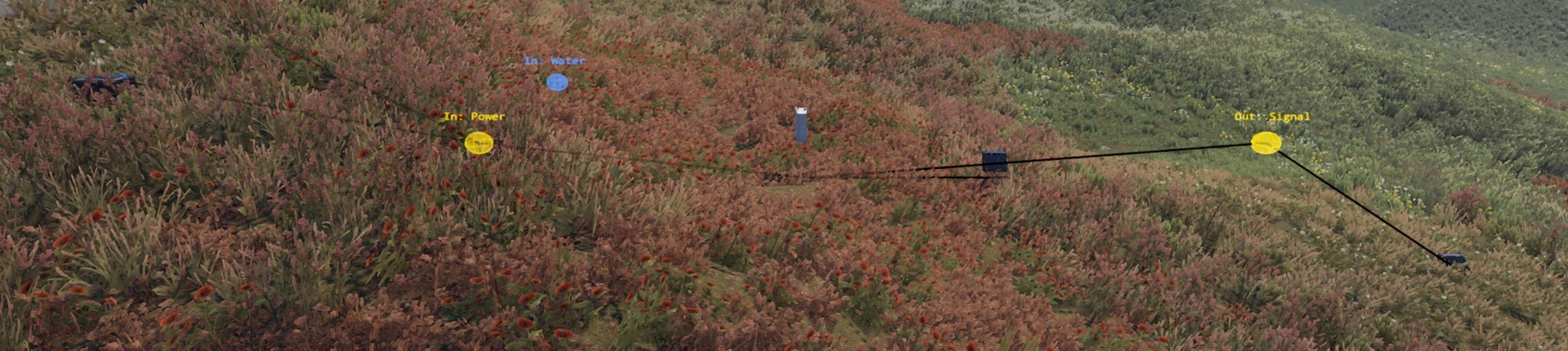
The placed monument shows its ports as small balls, with their names over them: "In: Power" or "Out: Signal". The color shows the wire: yellow for power, blue for water, orange for industrial. Select the monument to see the wires of its ports.
To wire an object on the map into the monument:
- Select the object, for example a generator.
- In the Inspector, click Connect on its output.
- Click the placed monument, or one of its IO inputs. With more than one free input of the wire's type, a menu asks which one. A monument with no free input of that type says so in the Notifications panel.
To wire the monument to an object on the map:
- Select the placed monument.
- In the Inspector, find the IO Ports panel. It lists the monument's inputs and outputs, with what each is wired to.
- Click Connect on an output, then click the object.
Click Disconnect on a card to take its wire out. Each change is one undo step.
When the monument changes
When you save the monument, every placed copy is built again from the file. The wires go back on the ports of the same names.
If you rename or delete a port, the map's wire to it is left out. The Notifications panel says "The monument ... has no IO port called ... now". Give the port its old name back, or wire the map again.
If you unpack a placed monument, its ports become normal objects of the map, and their wires stay.
Monuments inside monuments
You can place a monument inside another one and wire it there:
- Open the outer monument for editing.
- Place the inner monument in it.
- Wire the outer monument's ports to the inner monument's ports, as you do on a map.
On the map, only the outer monument's ports show. The wires go on through the inner monument's ports.
In the exported map
An exported map has no ports. Each wire through a port goes straight to the object on the other side of it. For example, a generator on the map that is wired to a port, which is wired to a light inside the monument, is exported as a generator wired to the light. The RustEdit 2 Server Extension needs no update for this.
A wire into a port whose inside has no wire is left out of the exported map.
Only scene files keep the ports and the wires by the port's name.
Related
- IO Port
- IO Ports (the Inspector panel)
- Create and Edit Monuments
- Placed Monuments
- IO Wiring