NPC Spawners
An NPC Spawner spawns one of Rust's NPCs on the server, at its place and facing its way. When the NPC dies, a new one spawns. It is one of RustEdit's server objects.
One spawner spawns one NPC at a time. For a group of NPCs, place a spawner for each one.
Before you start
The server needs the RustEdit 2 server extension, and the map must be exported with Entities set to In RustEdit data. A map exported with In the map has no spawners.
How to place an NPC spawner
- In the Content Browser, open Server Objects.
- Drag NPC Spawner into the scene view, where the NPC should spawn. The scene view shows an orange sphere.
- Turn the spawner the way the NPC should face.
- In the Inspector, pick the NPC in NPC. The scene view shows the NPC in the clothing that Rust gives it, with its name over it.
- Set how it respawns, how far it goes and what it wears. See the sections below.
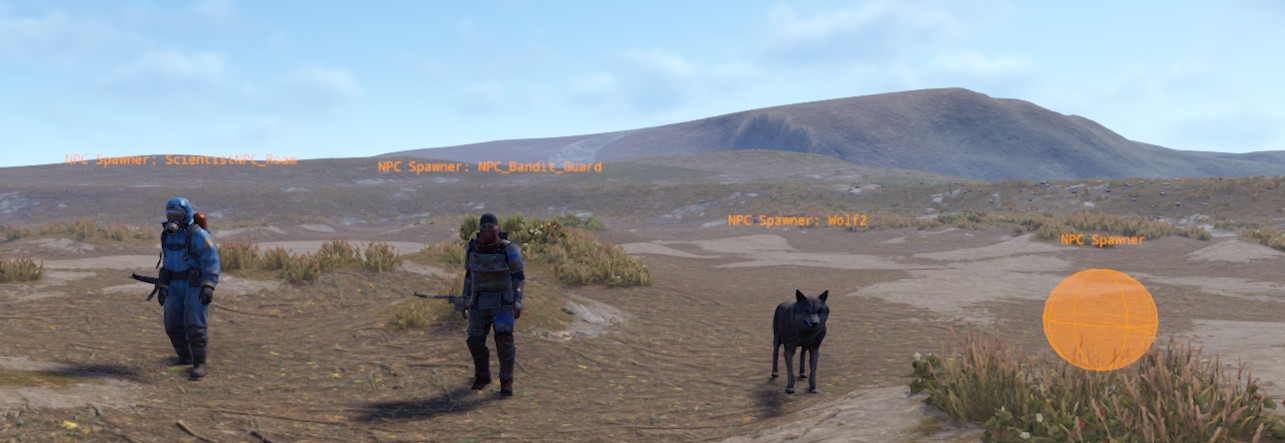
Click the NPC or the sphere to select the spawner. A box selection takes it too. You can also place spawners in a custom monument.
Pick the NPC
The NPC list holds Rust's people and animals. It shows only the NPCs that the Rust game on your computer has.
| Kind | In the list |
|---|---|
| Scientists | The ScientistNPC_ NPCs, such as ScientistNPC_Roam, ScientistNPC_Patrol, ScientistNPC_Oilrig and ScientistNPC_Heavy |
| Gen2 scientists | Scientist2, Scientist2.Heavy, Scientist2.Shotgun |
| Other people | NPC_Bandit_Guard, NPC_TunnelDweller, NPC_TunnelDwellerSpawned, NPC_UnderwaterDweller, Scarecrow |
| Animals | Panther, Rabbit, SeaTurtle, Lamb, Sheep, snake.entity, Squirrel, Stag, Tiger, Wolf2 |
With None, the spawner spawns nothing. It is still in the exported map with its settings, so a server plugin can use it, for example to spawn its own NPCs there.
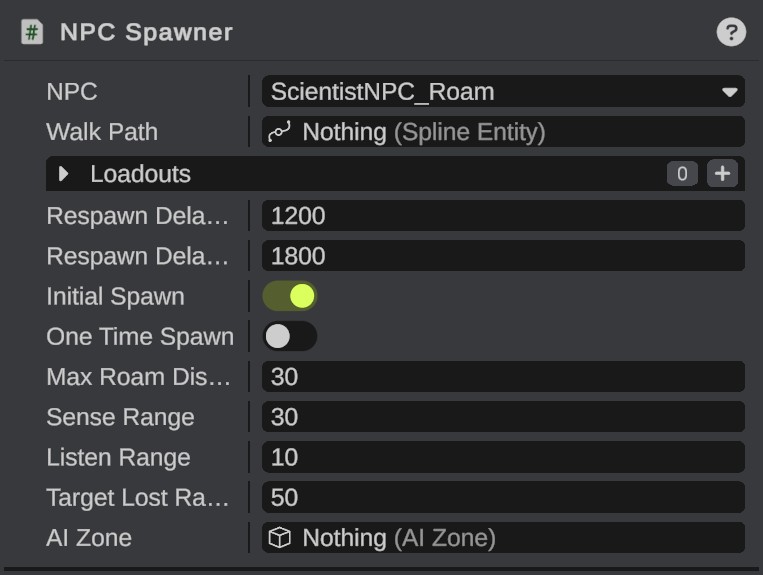
Respawn
| Field | What it does |
|---|---|
| Respawn Delay Min, Respawn Delay Max | After the NPC dies, the next one spawns after a time between these two, in seconds. |
| Initial Spawn | On: the NPC spawns when the server starts. Off: the first one comes after a respawn delay. |
| One Time Spawn | The NPC spawns once and never again. |
Where the NPC goes
An NPC either roams or walks a path.
- Max Roam Distance: how far a roaming NPC may go from its spawner, in meters.
- Walk Path: an NPC path the NPC walks, with stops where it waits. Drag a spline entity with an NPC path from the Hierarchy onto the field. While the spawner is selected, a dashed line goes to the point where its NPC joins the path.
- AI Zone: the AI zone whose points the NPCs use, wherever they are. Without one, they use the AI zone they stand in. Scientists need a zone to move: without one they stand still. The extension makes a zone round a spawner of scientists that no zone holds.
To remove a walk path or a zone, right-click the field and click Clear. AI Zone shows only for people, and works for the older human NPCs: not for the Gen2 scientists, which use the zone they stand in.
Senses
These show only for people. Animals have their own senses.
| Field | What it does |
|---|---|
| Sense Range | How far the NPC sees players, in meters. |
| Listen Range | How far the NPC hears players, in meters. |
| Target Lost Range | How far a player must get away before the NPC stops the chase, in meters. |
Clothing and weapons
Loadouts gives the NPC its clothing, weapons and items from loadout profiles.
- Click + to add a row.
- Drag a loadout profile onto the row from the Content Browser, folder Profiles > Loadout Profiles. Or click the row and pick one.
With several rows, the server picks one at random each time the NPC spawns. The scene view shows the NPC in the first one. An empty list keeps the NPC's own items. The Gen2 scientists and the animals have no inventory, so they have no Loadouts list.
Tips
- Copy a set-up spawner with Ctrl+D. A spawner duplicated with its walk path or AI zone uses the copies.
- A broken monument gives you Rust's own NPC spawners for a monument, with Rust's settings. Start from those to change a monument's NPCs.
Troubleshooting
| Problem | What to do |
|---|---|
| No NPC spawns on the server | Check that NPC is not None, that the map was exported with In RustEdit data, and that the server has the extension. With Initial Spawn off, wait for the respawn delay. |
| Scientists stand still | They have no AI zone. Place an AI Zone round them and click Fill. See AI Zones. |
| The export says a spawner "walks an NPC path the scene does not have" | Its walk path was deleted. Give it a path again, or clear the field. |
| The export says a spawner "has an AI zone the scene does not have" | Its AI zone was deleted. On the server, its NPC uses the AI zone it stands in. |
See NPC Spawner for every field of the panel.