Vendors
Vendors are NPCs that players buy from by talking to them. RustEdit has two kinds, both in the Server Objects folder of the Content Browser:
| Object | Sells | Like Rust's |
|---|---|---|
| NPC Vendor | Items, from a vending profile | Shopkeepers at the safe zones |
| Vehicle Vendor | Helicopters, a hot air balloon, boats or submarines | Vendors at the bandit camp and the fishing villages |
Before you start
The server needs the RustEdit 2 server extension, and the map must be exported with Entities set to In RustEdit data. A map exported with In the map has no vendors.
Shopkeepers
In Rust, a shopkeeper needs two parts on the same spot: the shopkeeper NPC, and an invisible vending machine that holds the orders. The NPC Vendor is both parts in one object, so they always stand together.
- Drag NPC Vendor from Server Objects into the scene view. The scene view shows the shopkeeper, with the name of its vending profile over it.
- Turn it the way the shopkeeper should look. It waves at players in front of it.
- In the Inspector, pick the Shopkeeper: bandit_shopkeeper, bandit_shopkeeper_sitting or waterwell_shopkeeper.
- Drag a vending profile onto Vending Profile from the Content Browser, folder Profiles > Vending Profiles. Or click the field and pick one. The shopkeeper sells the profile's orders.
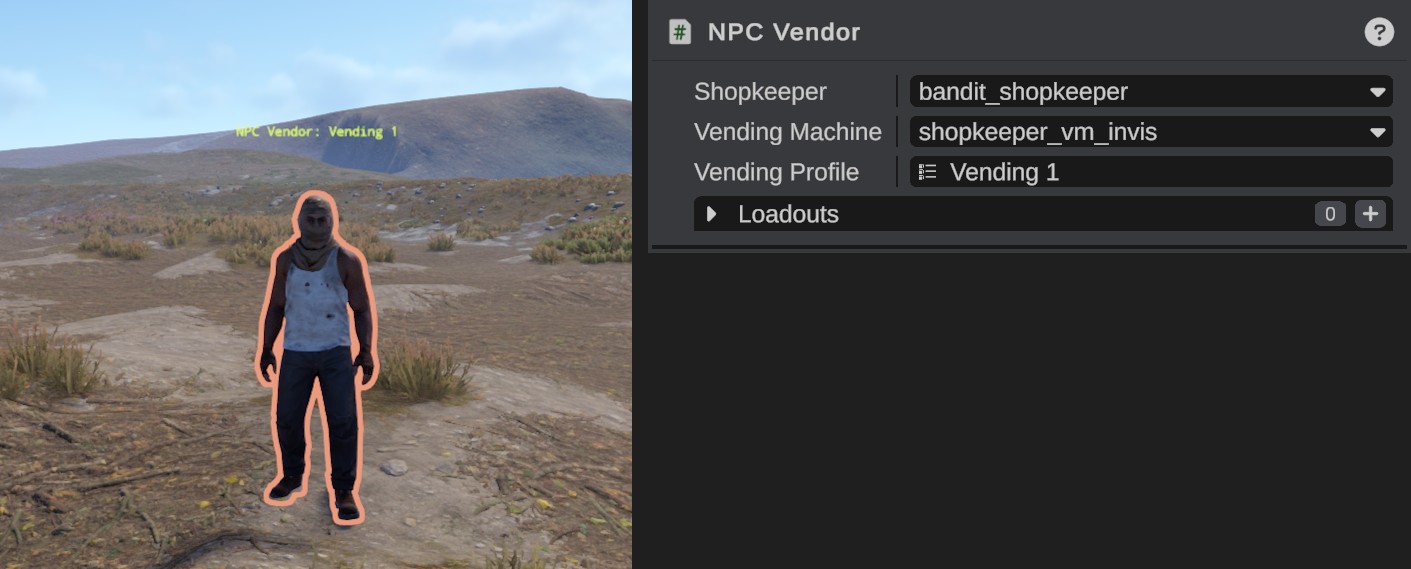
With Vending Profile set to None, the shopkeeper sells the orders of the Vending Machine you picked: the orders that machine has at Rust's monuments. The map carries a copy of the vending profile.
You can move and turn a vendor, but not scale it.
Vehicle vendors
In Rust, a vehicle vendor needs two parts: the vendor NPC, and a vehicle spawner. The vendor sells, and the spawner makes the vehicle on its spot.
| Vendor | Sells | Its spawner |
|---|---|---|
| bandit_conversationalist | Minicopter, scrap transport helicopter, attack helicopter, hot air balloon | airwolfspawner |
| boat_shopkeeper | Rowboat, RHIB, solo submarine, duo submarine | boatspawner |
- Place the spawner prefab, airwolfspawner or boatspawner. Type its name in the search box of the Content Browser to find it.
- Drag Vehicle Vendor from Server Objects into the scene view, near the spawner.
- In the Inspector, pick the Vendor.
- Drag the spawner from the Hierarchy onto Vehicle Spawner. While the vendor is selected, an arrow goes from it to its spawner.

Keep the spawner near the vendor: a purchase reaches only the spawners within 20 m of a boat vendor, or within 40 m of an Airwolf vendor. Every spawner of that vehicle in reach spawns one, so keep no other spawner of the same vehicles that near.
Without a linked spawner, Rust links the vendor to the nearest spawner within 40 m that spawns its vehicles. The scene view shows that 40 m circle round a selected vendor without a spawner.
The Airwolf spawner has a helipad that players repair before the vendor sells: airwolf_helipad.repairable. Place it where the spawner spawns its vehicles. See Repairable Vehicle Pad.
Rust's stables vendor sells nothing, so it is not in the Vendor list. A horsespawner puts horses up for sale by itself, without a vendor.
Clothing
Both kinds have Loadouts: the vendor's clothing, weapons and items from loadout profiles. With several, the server picks one at random each time the vendor spawns. Without loadouts, the vendor wears Rust's own clothing for it.
Troubleshooting
| Problem | What to do |
|---|---|
| The scene view shows a green or blue shape in place of the vendor | RustEdit cannot show Rust's NPC. The vendor still works on the server. |
| A purchase spawns no vehicle | Check that the spawner is within 20 m (boats) or 40 m (Airwolf) of the vendor, and that it spawns the vendor's vehicles. |
| Two vehicles spawn for one purchase | Two spawners of the same vehicles are in reach. Move one away. |
| Vehicle Spawner shows Missing spawner | The spawner was deleted. Undo the delete, or link another spawner. |
See NPC Vendor and Vehicle Vendor for every field.