Noise Settings
The Noise height tool and the Noise filter make a noise pattern: a random-looking pattern of high and low values, for rough, natural ground. Both use the same noise settings. This page explains each of them.
- The Noise tool raises or lowers the ground by the pattern.
- The Noise filter uses the pattern to limit where a brush works.
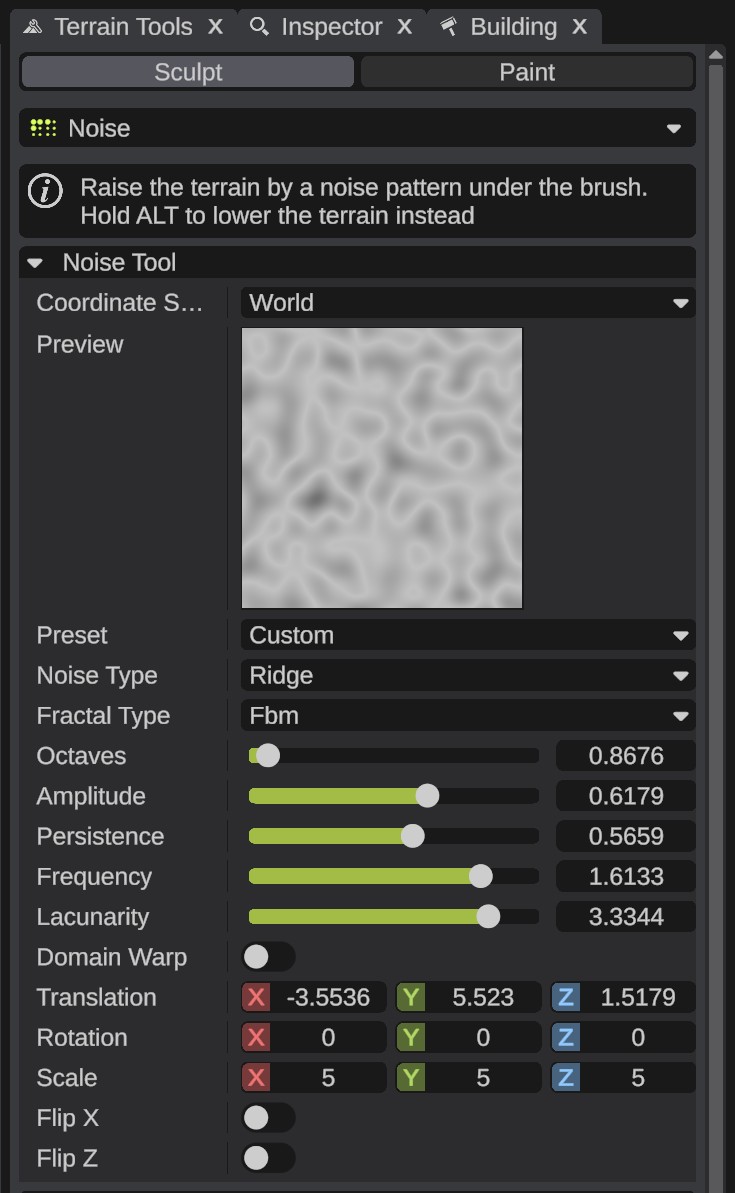
Start from a preset
- Pick the Noise tool, or add a Noise filter.
- In Preset, pick a ready-made noise, such as Perlin or Ridge. Every value below changes to the preset's values.
- Look at the Preview. Drag it to move the noise, and scroll on it to zoom.
- Change Scale to make the pattern bigger or smaller. Preset changes to Custom.
The settings
| Option | What it does |
|---|---|
| Coordinate Space | World: the noise stays in place on the ground, so the stamps of a stroke fit together. Brush: the noise moves and turns with the brush. |
| Preview | A picture of the noise. Gray is above the middle, cyan below. It shows 512 m in world space, or the brush in brush space. Drag it to move the noise, scroll to zoom. |
| Preset | Ready-made noise settings: Billow, Perlin, Ridge, Smooth Rock, Value, Voronoi and Warped Ridge. Picking one replaces every value below. Editing a value sets it back to Custom. |
| Noise Type | The base noise: Perlin, Billow, Ridge, Value or Voronoi. |
| Fractal Type | How layers of the noise are stacked. Fbm, the usual kind, adds finer and fainter layers. Strata turns them into bands, like rock layers. None uses the base noise alone. |
| Octaves | How many layers. A fraction blends toward one more. |
| Amplitude | The strength of the first layer. |
| Persistence | How much weaker each layer is than the one before. |
| Frequency | The frequency of the first layer. |
| Lacunarity | How much finer each layer is than the one before. |
| Strata Offset | Strata only. Shifts the bands up or down. |
| Strata Scale | Strata only. A higher value makes more bands. |
| Domain Warp | Bends the noise by itself, for swirls and turbulence. |
| Warp Iterations | How many times the noise bends itself. |
| Warp Strength | How far each bend pushes. |
| Warp Offset | Where the bends sample the noise. |
| Translation | Moves the noise. Changing Y gives a different pattern in the same place. |
| Rotation | Turns the noise, in degrees. Y turns it on the ground. |
| Scale | Noise cells in every 512 m in world space, or across the brush in brush space. |
| Flip X, Flip Z | Mirror the noise on that axis. |
Rows that do nothing for the picked Fractal Type are hidden.
The Noise node of the Terrain Graph has the same noise in its Unity style. See Nodes.