Brush Graph
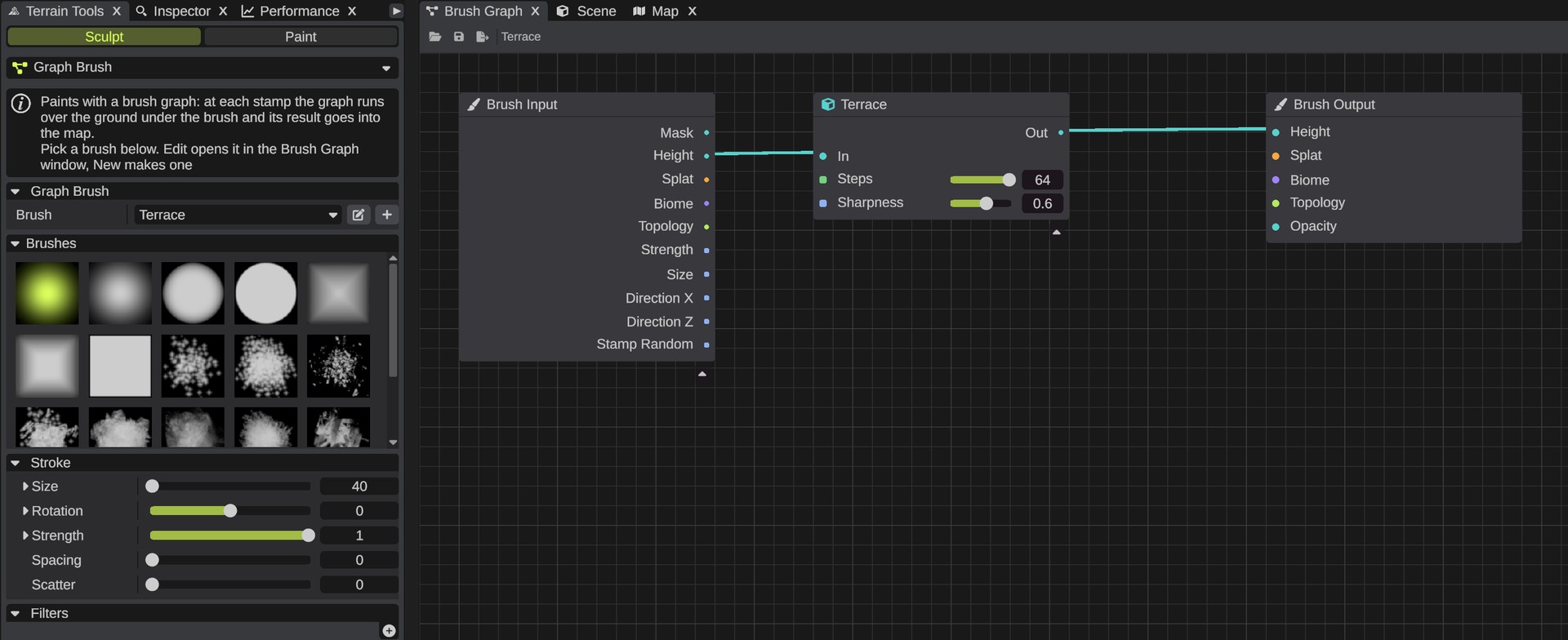
RustEdit ProA brush graph is a terrain brush that you build from the nodes of the Terrain Graph: a brush that cuts terraces, raises noise, erodes slopes or paints rock on steep ground. You build it in the Brush Graph window and paint with it with the Graph Brush tool of the Terrain Tools. At each stamp, RustEdit runs the graph over the ground under the brush and writes the result into the map.
Before you start
- You need RustEdit Pro or higher. Without it, Graph Brush is not in the tool list and the Brush Graph window is not in the menu. A window opened from a saved layout shows only This feature requires RustEdit Pro. See Free, Plus, Pro and Sponsor.
- Open a map.
Paint with a brush graph
- Open the Terrain Tools and click Sculpt.
- Open the tool list and pick Graph Brush, in the Sculpt group. The Graph Brush section shows.
- In the Graph Brush section, pick a brush graph in the Brush list.
- Pick a brush shape in the Brushes grid, and set the Stroke settings and the Filters, as for any other tool.
- Hold Mouse Left and drag over the terrain. At each stamp, the ground under the brush changes.
A stroke is one undo step, even when it changes several maps: Ctrl+Z undoes all of it. To keep painting fast, the brush shows only its outline before you click, tinted by the filters, not the result.
The Graph Brush section
| Option | What it does |
|---|---|
| Brush | The brush graph you paint with. It lists the brush graph files in your Brush Graphs folder by name. RustEdit reads the folder again each time you open the list. With no files, the list says No brush graphs. |
| Edit (pen button) | Opens the picked brush graph in the Brush Graph window. With no brush graph picked, it does the same as New. |
| New (plus button) | Makes a brush graph named New Brush (then New Brush 2 and so on) in the Brush Graphs folder, picks it, and opens it in the window. It changes nothing until you wire its nodes. |
RustEdit keeps the brush graph you picked for the next time you start it.
Each brush graph file keeps its own Stroke settings and Filters. A brush graph you have not used yet starts with the defaults, for example Size 5. The settings are kept by the file's name, so a renamed file starts from the defaults again.
Build a brush
- Click New in the Graph Brush section, or open . The Brush Graph window shows a Brush Input node on the left and a Brush Output node on the right.
- Add nodes and wire them from Brush Input to Brush Output.
- Click Save, or press Ctrl+S. A graph with no file yet asks where to save: keep it in the Brush Graphs folder, so the Brush list shows it. The Graph Brush reads the file again before its next stroke.
What Brush Input gives, what Brush Output writes into the map, and which nodes you can use are on Brush Graph Inputs and Outputs.
The window works like the Terrain Graph window. See Graph Editor for nodes, wires, keys and undo, and Organize a Graph for group boxes and portals. The differences:
- There is no Apply, and the window never changes the terrain. The Graph Brush uses the graph.
- Brush graphs are
.brushgraphfiles. Open and Save As start in the Brush Graphs folder. - Each brush graph has exactly one Brush Input and one Brush Output. You cannot delete or copy them. A file without one gets it back when you open it.
- Edit in the Graph Brush section asks first when the window has changes that are not saved.
The example brushes
RustEdit writes four example brushes into the Brush Graphs folder the first time it lists the brushes. Each is written once: your changes are not written over, and an example you delete does not come back.
| Brush | What it does |
|---|---|
| Terrace | Cuts the ground into steps: a Terrace node with Steps 64, which makes steps of about 16 meters on Rust's 1000 meter terrain height. |
| Noise Raise | Adds Noise (Scale 60) to the height with a Blend node (Add, Opacity 0.002): up to 2 meters for each stamp at full strength, about 4 meters for one stroke. |
| Erode | A Thermal Erosion node with Talus 0.001, 80 Iterations and Strength 1: slopes steeper than about 27 degrees slide down, up to about 2 meters in one stroke on a steep hill. Paint over the same place again to wear it down more. |
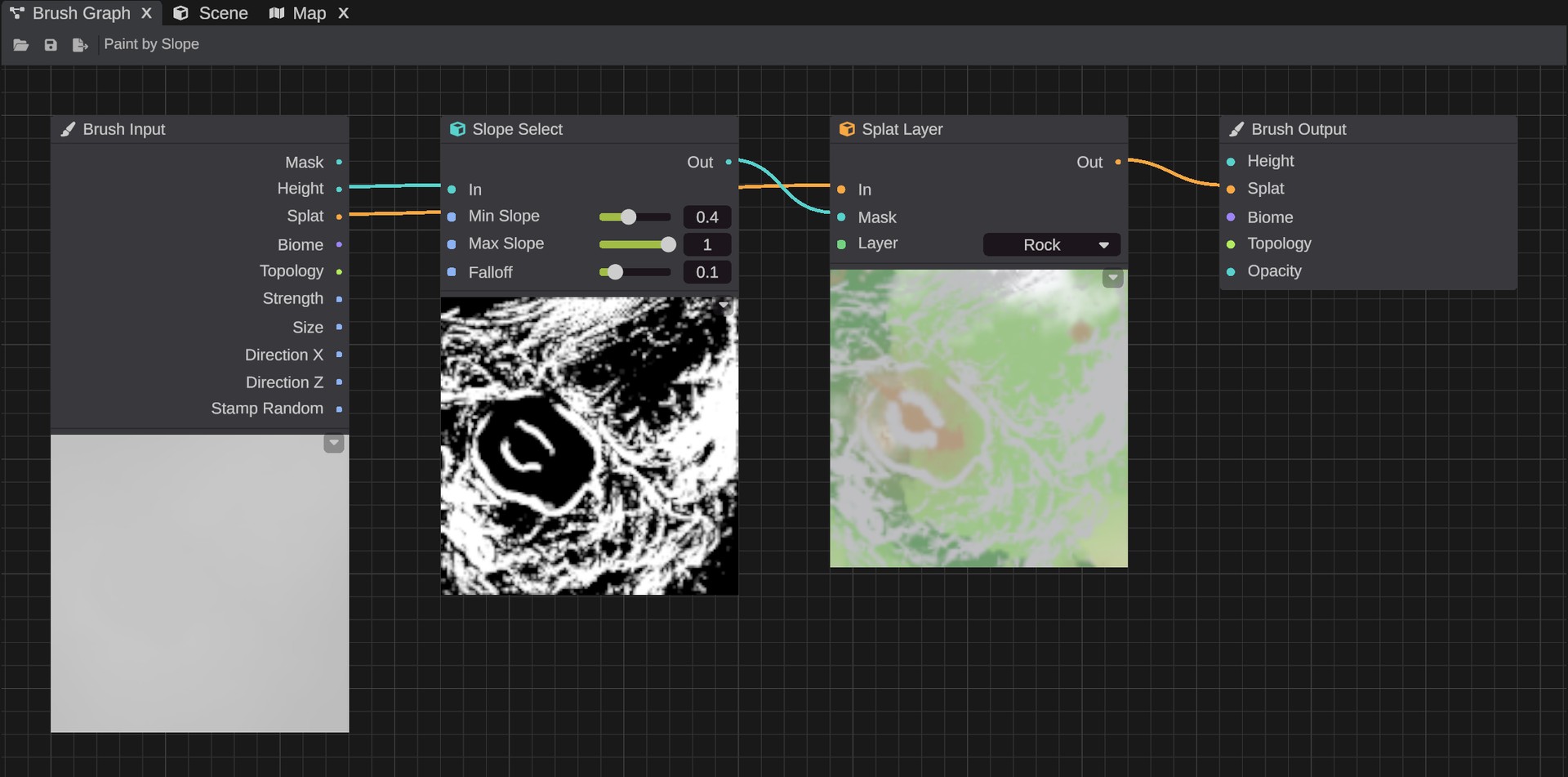
| Paint by Slope | Paints Rock where a Slope Select mask (Min Slope 0.4, about 36 degrees) is high, on Brush Input's splat. |
The numbers are for a brush about 40 meters wide at full Strength. Lower the Strength for a lighter touch.
Files and folders
- The Brush Graphs folder is the
BrushGraphsfolder next to the RustEdit app. To use another folder, open , then Paths, and set Brush Graphs. The Brush list uses it the next time you open the list, without a restart. - A brush file does not hold the custom nodes it uses. To give a brush to someone, also give them its custom nodes. See Share custom nodes.
- If a brush file changes outside the window, the Graph Brush reads it again before its next stroke.
Tips
- Heavy nodes, such as erosion with many iterations, run at every stamp. With a big brush, raise Spacing in the Stroke settings so fewer stamps land.
- Use Brush Input's Direction X and Direction Z for brushes that follow the stroke, and Stamp Random for brushes that change a little at each stamp. See Brush Input.
Troubleshooting
| Problem | What to do |
|---|---|
| "Pick a brush graph first, or make one with New" | No brush is picked, or its file is gone. Pick one in the Brush list, or click New. |
| "The brush graph ... writes nothing" | Wire something into Brush Output, then save the graph. |
| "The brush graph ... could not be read" | The file is damaged, or it is another kind of graph, such as a renamed .terraingraph file. The message says why. |
| The stroke changes nothing. | Check Strength, the filters and Opacity. For topology, the weight must be over 0.5. See How a stamp works. |
| The brush removes topology flags. | Start the topology from Brush Input's Topology. See Brush Output. |
| A node is not in the Add Node menu. | It needs the whole map. See Nodes. |