Spline Profile Window
RustEdit ProThe Spline Profile window is where you build a spline profile: the node graph that a Graph Profile terrain spline uses to shape and paint the ground beside its line. It is the Terrain Graph editor, with two nodes of its own: Profile Input and Profile Output. To give a profile to a spline, see Spline Profile.
The Spline Profile window
Open it with Edit or New in the Inspector rows of a Graph Profile spline, or with .
The window is the Terrain Graph editor: the same canvas, wires, group boxes, node previews, undo and keys. The bar at the top of the window has Open, Save, Save As and the file name. There is no Apply: the profile changes the terrain through the splines that use it.
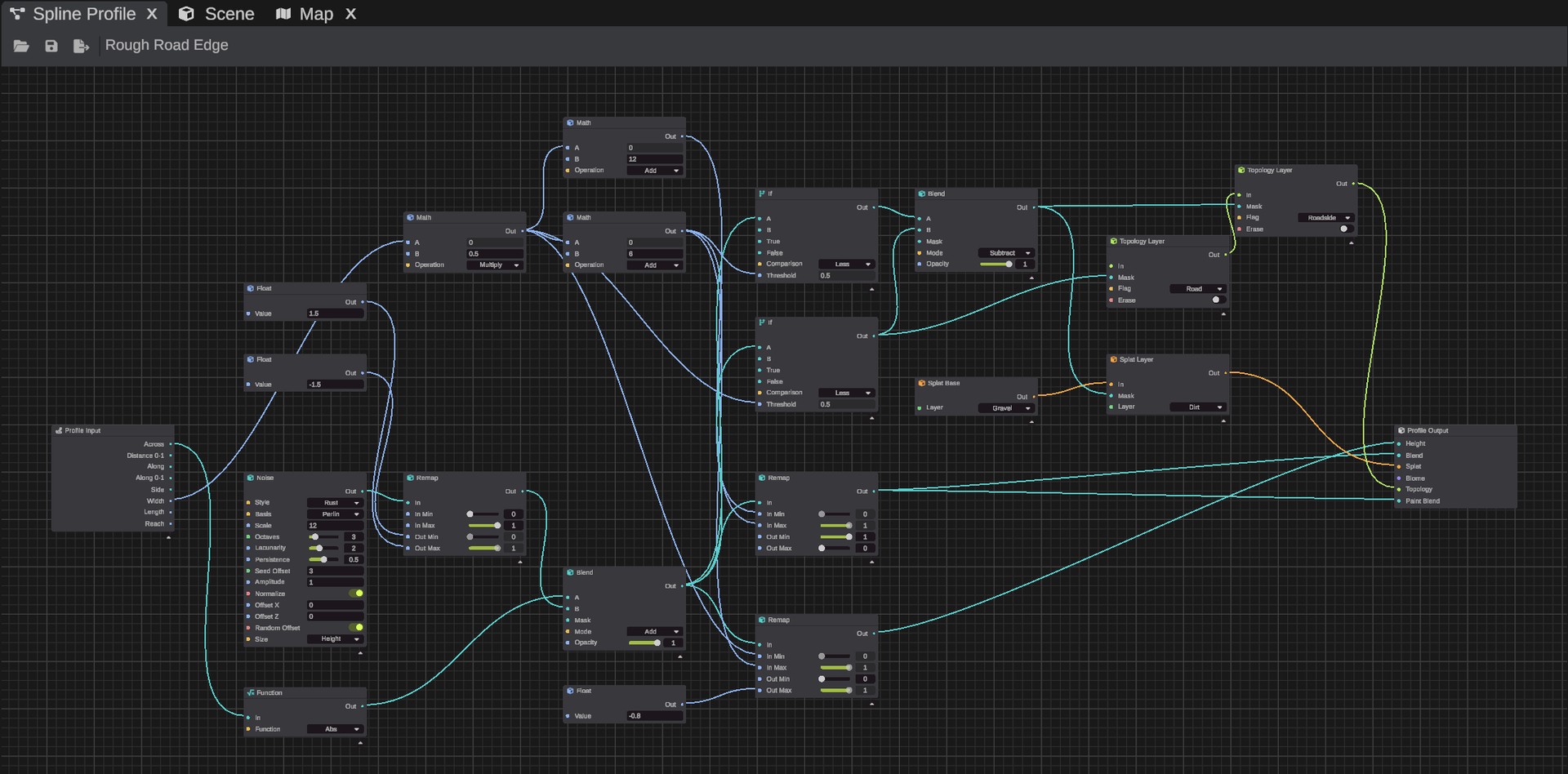
- Every profile has one Profile Input node and one Profile Output node. You cannot delete or copy them. A file without one gets it back when you open it.
- When RustEdit starts, the window holds a new profile: a bank 3 meters high in the middle of the line that eases into the ground at the reach.
- Only nodes that lead to the Profile Output run.
- Node previews show the profile over a sample strip: a line 10 meters wide and 200 meters long, with a reach of 30 meters. Previews show values from 0 to 1, so a port in meters, such as Across, shows black below 0 and white above 1.
Live editing
While the window shows a profile file, every Graph Profile spline that uses that file follows the graph in the window, saved or not. So you see each change on the terrain at once.
- Save writes the file. The change then stays.
- When you close the window or hide its tab, the lines go back to the saved file. Changes that are not saved no longer show on the terrain.
- Open at the top of the window, and Edit or New in the Inspector, ask first when the window has changes that are not saved. Edit on the profile the window already shows changes nothing.
Nodes
Every node of the Terrain Graph works in a profile, except these:
- The nodes that read the map or need the whole map at once: Current Map, Texture, Spline Mask, Normalize, Flow and Topology Flood Fill.
- The nodes that need the real ground: Hydraulic Erosion, Thermal Erosion, Beach, Ledge and Sea Level. A profile's height is a height over the line, not a height above the sea.
- The Terrain Output node.
See Terrain Graph Nodes.
Nodes that place by position, such as Noise and Voronoi, work in meters across and along the line. A noise with a Scale of 30 meters makes features about 30 meters apart along the line, however the line bends.
Custom nodes can be placed in a profile when every node inside them is one a profile can hold.
Profile Input
The Profile Input node gives the place of each point of the strip beside the line. A Map port gives one value for each point of the strip. A Number port gives one value for the whole line.
| Port | Kind | What it gives |
|---|---|---|
| Across | Map | Meters from the middle of the line: negative on the left, looking along it, positive on the right. |
| Distance 0-1 | Map | How far from the middle of the line: 0 in the middle, 1 at the reach, on both sides. |
| Along | Map | Meters along the line from its start. |
| Along 0-1 | Map | How far along the line: 0 at its start, 1 at its end. |
| Side | Map | -1 on the left of the line, looking along it, 1 on the right. |
| Width | Number | The line's Width setting in meters, the full width. |
| Length | Number | The line's length in meters. |
| Reach | Number | The line's Reach setting in meters. |
RustEdit works out only the Map ports that a node reads.
Profile Output
| Port | What it does | Not wired |
|---|---|---|
| Height | Meters over the line's own height there. 0 is the line's height, negative is under it. | The height is left as it is. |
| Blend | How much the ground takes Height, from 0 to 1. | 0: the height is left as it is, even with Height wired. |
| Splat | The ground textures to paint. | The ground textures are left as they are. |
| Biome | The biomes to paint. Only Arid, Temperate, Tundra and Arctic reach the terrain. | The biomes are left as they are. |
| Topology | Topology flags to add. A flag is added where its value is over 0.5. | No flags are added. |
| Paint Blend | How much Splat and Biome are painted, from 0 to 1. | 1: they are painted fully. |
Make the shape from 0 to 1 first, for example with a Curve node on Distance 0-1. Then turn it into meters with a Remap node: wire a Float node with the depth or height into Out Min or Out Max. A wired number can go past the slider's range.
Let Blend fall to 0 at the reach. Where it is still over 0 at the reach, the ground ends in a step there.
How a profile changes the ground
A profile works on a strip beside the line:
- Across: from the middle of the line out to the reach on each side. The left side is negative and the right side positive, as you look along the line from its first knot to its last. To swap the sides, click Reverse Flow in the spline widget.
- Along: from the line's first knot (0) to its end. Along is measured over the ground, as seen from above.
For each spot of ground, RustEdit finds the nearest point of the line. It then reads the profile at that spot's place across and along the line.
- Height: the ground goes to the line's height plus the profile's Height, by the profile's Blend. The line's height comes from its knots, as for the other terrain splines.
- Splat and Biome: the ground textures and biomes move toward the profile's, by its Paint Blend. Where the profile paints no layer, they stay as they are.
- Topology: the profile's topology flags are added. A profile never removes a flag.
Past the ends of an open line, the profile goes on straight and fades out over the reach. A closed line has no ends.
Graph Profile lines are applied with the other terrain splines: after your terrain edits, the terrain changes of placed prefabs, and the terrain modifiers of roads, rivers and rails. See How it works with other terrain changes.
While you drag a knot, the ground waits. When you let go, it follows.
Limits
- Along the line, the profile is worked out at least every 2 meters on a line up to about 2 km long. A longer line gets 1024 steps over its length: a 4 km line gets one about every 4 meters. Finer detail along the line is smoothed out.
- Across the line, the profile is kept at 128 steps over both sides of the reach: about every half meter with a reach of 30 meters, and every 1.6 meters with a reach of 100.
- The line is followed in straight pieces of 2 to 16 meters. Lines longer than 800 meters use longer pieces.
- On a closed line, Along jumps from the end back to 0 at the first knot. A profile that changes along the line shows a seam there.