Physics Settings
RustEdit ProThe Physics Settings at the top of the Physics Tools panel are the same for every tool. They set what the prefabs bump into, how fast they fall and when they count as at rest. This page also lists which prefabs move and what stops them.
Options
Click Physics Settings to open them. RustEdit remembers them, and whether they are open, the next time you start it.
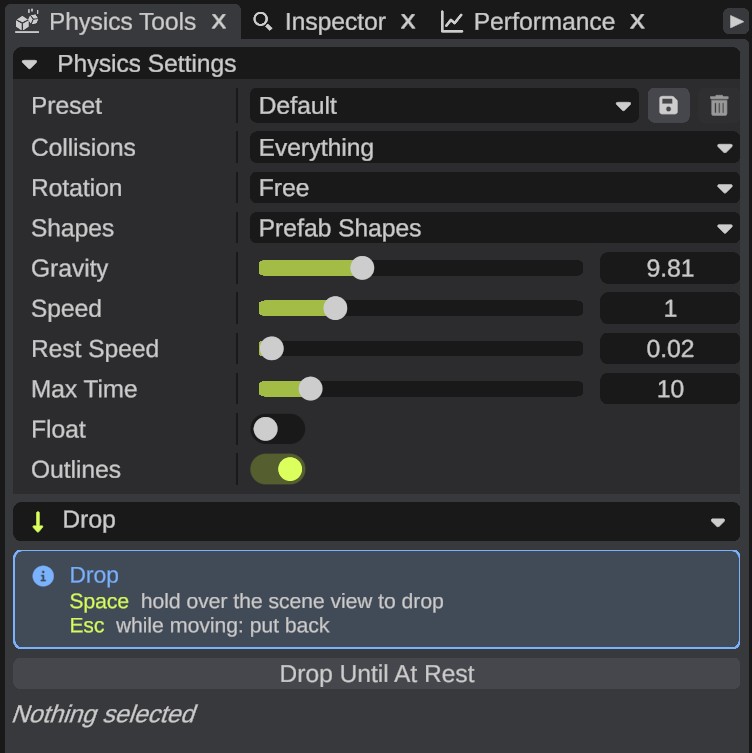
| Option | What it does |
|---|---|
| Preset | Sets all the options below at once. See Presets. |
| Collisions | What the moving prefabs bump into. Everything: the ground, other prefabs and each other. Not Each Other: the ground and other prefabs, but the moving prefabs pass through each other. Terrain Only: only the ground. |
| Rotation | Free: the prefabs can tip over and roll. Keep Upright: they only turn around their up axis. A prefab that is tilted keeps its tilt. |
| Shapes | Prefab Shapes: each prefab uses its own collision shapes from the game. A shape with dents or holes is filled in to its outer shape. A prefab without solid shapes gets one shape around what you see. Box: each prefab is one box of its size. Faster, but round things do not roll. |
| Gravity | How fast things fall. The game's gravity is 9.81. |
| Speed | How fast physics runs. 1 is real time. Lower it to watch closely. |
| Rest Speed | A prefab slower than this, in meters per second, counts as at rest. |
| Max Time | The longest the prefabs keep moving by themselves after Drop Until At Rest, a Scatter tool or a Create tool, in seconds. |
| Float | The prefabs float on the sea, lakes and rivers instead of sinking to the bottom. |
| Outlines | Draws the shapes physics uses while the prefabs move: orange while they move, green when they are at rest. |
Presets
Pick a preset in Preset to set all the options at once:
| Preset | What it is for |
|---|---|
| Default | The values the panel starts with. |
| Precise | The prefabs settle longer and come to rest more exactly. |
| Fast | Boxes at double speed that stop sooner. Good for many prefabs. |
| Tidy | Upright, and not on each other. Good to set prefabs down on uneven ground. |
| Floating | The prefabs float on water. |
When you change an option, Preset shows Custom, or the preset the values match.
To keep the values you set as your own preset, click the save icon beside Preset and type a name. Your presets come after the built-in ones. To delete one of yours, pick it and click the trash icon.
What moves and what blocks
- Groups and placed monuments move as one body. A group or placed monument with a locked prefab in it, or with Apply Height on for it or for a prefab in it, does not move. Prefabs joined by sockets move with the prefab they are joined to.
- Up to 200 prefabs move in one run. The others stay where they are, and the Notifications panel says so.
- Other prefabs block with their own collision shapes from the game: what a player can stand on or bump into. Trigger areas and no-build zones do not block.
- A prefab without solid shapes of its own, such as a bush, gets one rounded shape around what you see, so it rolls and stacks like it looks. With Shapes set to Box, it is a box.
- A prefab that slips through the ground goes back where it was before the run.
- Hidden prefabs still block.
- The terrain blocks everywhere. The prefabs do not fall into caves.
- Water does not block. A prefab dropped into the sea sinks to the bottom, unless Float is on.
These prefabs never move. The Notifications panel lists each one with the reason:
| Prefab | Why |
|---|---|
| A locked prefab | You locked it. |
| A prefab with Apply Height on in its Terrain Modifier panel, such as a monument that brings its own heights | The ground under the other prefabs would change when it stops. Switch Apply Height off to move it. A prefab that only paints the ground moves, and its paint moves with it. |
| A part of a placed monument | Move the monument itself. |
| A prefab made by a prefab spline | The spline makes its prefabs again when it changes. |
| A volume or spawner | It has nothing solid to land on. |